
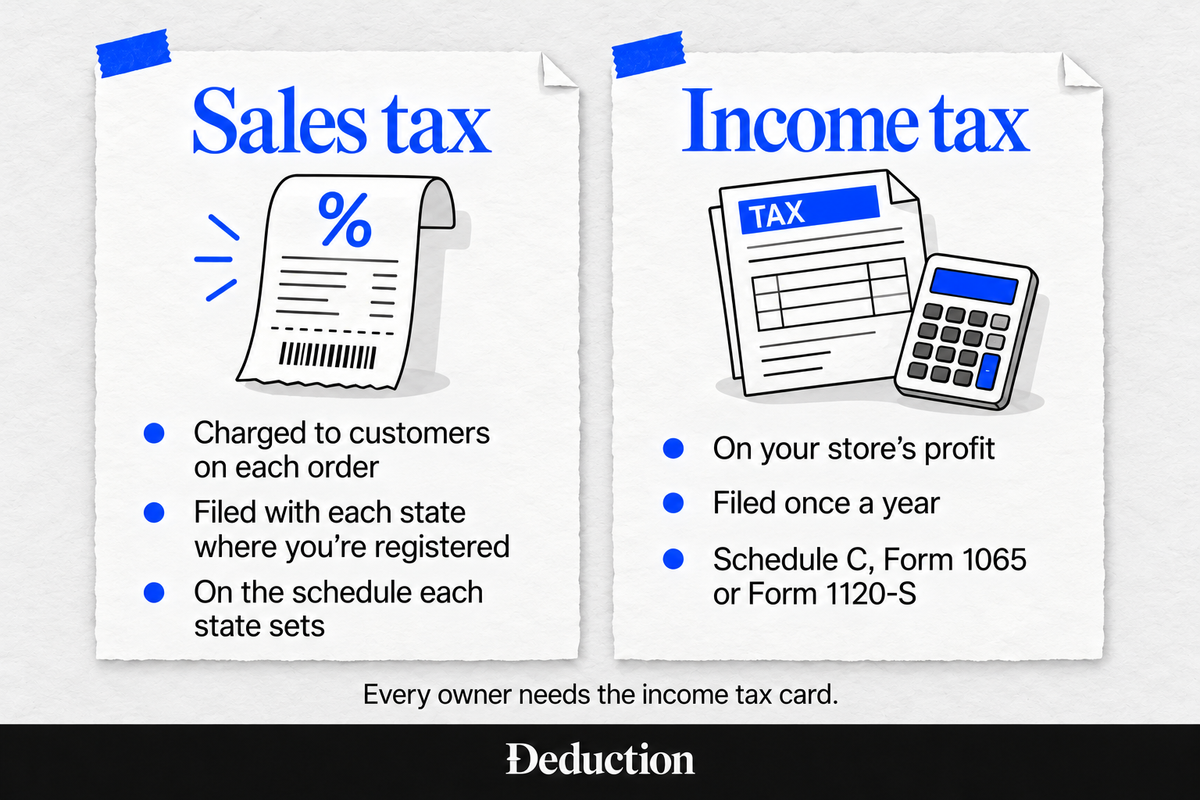
An online store comes with two tax jobs, and the best tax software for ecommerce owners depends on which one you need help with. One is the sales tax you charge customers in states that require it. The other is the income tax on your profit, filed once a year.
A sales tax tool rarely covers your income tax return, and Amazon, Etsy, and eBay already collect sales tax on marketplace sales for you. So it's easy to pay for software that doesn't do the job you need.
Here are 10 tools in two groups, with who each one suits and what it costs. Deduction is our own product, listed first among the income tax tools and judged on the same criteria as the rest:
Sales Tax Software for Ecommerce Owners
These tools figure the sales tax on your orders and, in most cases, file it in states where you have "nexus," meaning enough sales or presence there that the state requires you to collect its tax. None of these file your income tax return.
Shopify Tax
Best for: Shopify-only stores.
Shopify Tax is the sales tax tool built into Shopify. It works out the rate for each order from the buyer's exact address and your product categories, and charges it at checkout.
At tax time, it gives you reports of the tax collected by state, county and local area. Shopify's automated filing is closed to new sign-ups, so you file yourself or add a filing app.
Pros
- Built into checkout: Tax is figured inside the store you already run, with no separate app to install or orders to sync.
- Free for smaller stores: You pay no Shopify Tax fee until your sales pass $100,000.
- Threshold alerts: It shows your obligations state by state and tells you when you're getting close to a state's threshold.
- Product categories: It suggests a tax category for each product. That matters for items some states tax differently.
Cons
- Shopify orders only: Other sales made outside of Shopify aren't covered. A seller on several channels needs a second tool.
- No filing for new stores: Shopify doesn't file sales tax returns for stores not already enrolled in its filing service, and Shopify Tax doesn't file income tax returns.
- Fee on every order: Past the free amount, the fee applies to each order in states where you collect tax. Some users find that steep next to flat-fee tools.
Pricing
Shopify Tax is free until your sales pass $100,000, counted over the store's lifetime if it was created on or after May 13, 2026, or each year for older stores. After that, US stores on the Basic, Grow and Advanced plans pay 0.35% per order (0.25% on Shopify Plus), capped at $0.99 an order.
TaxJar
Best for: Small multichannel sellers.
TaxJar is a sales tax app for ecommerce sellers. It collects your sales data from Amazon, Shopify, Etsy, Walmart, WooCommerce and other marketplaces and online stores, then shows what you owe in each state.
When it's time to file, its AutoFile feature submits your state returns for a per-filing fee. It can also register you in new states where you've passed the threshold.
Pros
- Channel imports: Orders from the stores and marketplaces you connect sit in one view. The Starter plan connects up to three, and Professional up to 10.
- Automatic filing: Once you turn on AutoFile, TaxJar submits your state sales tax returns on schedule for you.
- State registration: For a set fee per state, TaxJar registers you in states where you've passed the threshold.
- Time saved: Some users mention it cuts the hours they used to spend pulling sales reports by state.
Cons
- Filing costs extra: Starter includes two AutoFile credits a year, and every filing after that costs $50. Monthly returns in even one state use 12 a year.
- Hard-to-reach support: Some users mention slow replies from customer service and no easy way to reach a person.
- No income tax filing: TaxJar covers sales tax only. Your yearly return needs separate software.
Pricing
The Starter plan costs $39 a month for up to 200 orders a month and includes two AutoFile credits a year, with $50 for each filing after that. Having TaxJar register you in a new state costs $299 per state.
TaxCloud
Best for: Budget-minded sellers with sales in Streamlined Sales Tax states.
TaxCloud is a sales tax service that prepares, files, and pays your state returns. Besides Shopify, it also works with stores built on WooCommerce and BigCommerce.
It's a certified provider in the Streamlined Sales Tax program, a group of 24 states where qualifying remote sellers can use certified providers for free.
Pros
- Free in SST states: If you qualify as a remote seller, registration, calculation and filing are free in Streamlined Sales Tax states.
- Low entry price: Starter begins at $19 a month, and filing plans add $39 a month or more.
- Helpful onboarding: Many users mention responsive help while they set up their account.
Cons
- Billing complaints: Some users describe charges after canceling or price increases after onboarding.
- No direct marketplace links: TaxCloud doesn't connect straight to Amazon, Etsy or eBay. To include those orders, you'd sync them into Shopify first or upload them as a file.
- No income tax filing: TaxCloud doesn't file income tax returns, so it covers only the sales tax half of your taxes.
Pricing
TaxCloud's Starter plan for Shopify stores begins at $19 a month for up to 100 orders, and filing plans start at $39 a month on top of that. Registering you in a state costs $249, though it can be free in Streamlined Sales Tax states.
Avalara
Best for: Sellers registered in many states.
Avalara is a sales tax platform with plans for businesses of every size. Its Avalara Select plans, for businesses under $50 million in yearly revenue, bundle tax calculation and filing for a set price per state.
It connects to many ecommerce sites and marketplaces, along with QuickBooks. Its managed returns service files your returns, sends the payments and handles letters from state tax agencies.
Pros
- Set price per state: Select plans list a price per state, so you can estimate the cost before a sales call.
- Wide connections: Select plans link to Shopify, Amazon, Etsy, eBay, Walmart, WooCommerce and QuickBooks.
- SST plan: On a plan at $69 per state a month, calculation and filing are free for qualifying sellers in the Streamlined Sales Tax states and Pennsylvania, and you pay $69 a month for each other state where you file.
Cons
- Costs add up per state: At $79 per state each month, a seller registered in five states pays $395 a month.
- Uneven support: Some users describe slow support, unclear notice of account changes and trouble canceling.
- No income tax filing: Avalara doesn't file income tax returns, even on its managed plans.
Pricing
Avalara Select Core Compliance costs $79 per state, per month, or $799 per state a year with a three-state minimum. Registering in a state costs $403 per location.
Numeral
Best for: Sellers who want hands-off filing priced per return.
Numeral is a managed sales tax service. Once you connect your store and marketplace accounts, Numeral registers you in new states, files your returns and sends the payments.
It connects to Shopify, Amazon, Walmart, eBay and QuickBooks. It also gives you a virtual mailbox that collects letters from state tax agencies.
Pros
- No platform fee: You pay only for filings and registrations, with no monthly or yearly subscription.
- Filing guarantee: Numeral says your sales tax will be filed on time or it'll pay the penalties and interest.
- Free nexus monitoring: The free plan watches your sales by state and alerts you when you cross into a new state.
- Responsive support: Many users mention quick, knowledgeable answers from the support team.
Cons
- Per-filing costs: At $75 per return, a state that assigns you monthly filing costs $900 a year.
- Occasional slips: A handful of users describe missed registrations or filing errors that led to penalties.
- No income tax filing: Numeral's service covers sales tax only and doesn't file income tax returns.
Pricing
Numeral charges $75 per return filed and a one-time $150 to register you in each state, with no monthly platform fee. Catching up on a missed past return costs $150, and closing a state account costs $450.
Income Tax Software for Ecommerce Owners
These tools prepare and file your yearly income tax return, usually with Schedule C. The do-it-yourself tiers of these services don't cover S corp or partnership returns, and none of these tools file sales tax.
Deduction
Best for: Schedule C sellers, simple solo S corps and small partnership LLCs that want a return reviewed by a CPA or licensed tax professional.
Deduction is our own product. It's a tax filing service built around AI, and Taylor, CPAI is its AI tax agent: you upload your 1099-Ks, statements and receipts, and Taylor tracks business expenses and prepares your return, including Schedule C.
A CPA or another licensed tax professional reviews every return. You review and approve it, and then Deduction files your federal and state returns, in any of the 50 states.
Pros
- Professional review: A CPA or licensed tax professional checks every return before it's filed.
- Year-round planning: You can ask Taylor questions at any point in the year, and it can calculate your quarterly estimated payments.
- Solo S corp returns: Deduction Business covers a simple solo S corp or small partnership LLC, not only Schedule C.
- Free to start: Questions and uploads are free. You pay when you're ready to file ($499 a year, or $999 for a simple solo S corp or small partnership LLC), or earlier if you want a licensed tax professional to review a high-impact decision.
Cons
- Steep single payment: At $499 for the year, it costs several times what the do-it-yourself tiers here charge.
- No sales tax filing: Deduction doesn't file sales tax returns, so you'd pair it with a sales tax tool if you collect in several states.
- Simple businesses only: Multi-employee S corps and C corps aren't supported.
Pricing
Deduction costs $499 a year and covers your federal and state returns, including Schedule C, plus year-round questions and planning. Deduction Business costs $999 for a simple solo S corp or small partnership LLC.
TurboTax Premium
Best for: Sole proprietors who want guided do-it-yourself filing with inventory entry built in.
TurboTax Premium is Intuit's do-it-yourself self-employed tax software, formerly called TurboTax Self-Employed. It walks you through the full Schedule C in an interview, along with depreciation and a home office.
For a store, you report inventory and cost of goods sold on the Schedule C expense screens. You prepare and e-file the return yourself, and live expert help is a separate tier.
Pros
- Guided interview: It asks plain-language questions and fills in Schedule C, plus the depreciation and home office forms, from your answers.
- Inventory entry: You can set up your inventory in the software to figure cost of goods sold.
- QuickBooks sync: If you keep your books in QuickBooks, it can fill in a single Schedule C from your account.
- Form imports: The mobile app can snap a photo of a 1099-NEC or 1099-K, and TurboTax imports last year's return as a PDF from other major tax software.
Cons
- State costs extra: Each state return carries an added fee, and the product page doesn't print the amount.
- Paid live help: Getting live expert help means upgrading to Expert Assist Premium.
- Frequent upsells: Some users describe repeated upgrade prompts and charges they didn't expect.
Pricing
TurboTax Premium is posted at $139 for a federal return. State returns cost extra, and Intuit doesn't print the state fee on the product page.
H&R Block Self-Employed
Best for: Sellers who want the option of an in-person office.
H&R Block Self-Employed is the company's online tier for sole proprietors filing Schedule C. It covers business expenses, depreciation, a home office and Form 1099-K income from payment apps and marketplaces.
You prepare the return yourself, with AI and live tax-pro help included. H&R Block also runs offices where a tax pro prepares the return for you.
Pros
- In-person offices: If you'd rather hand the whole return over, you can book a tax pro at an H&R Block office instead of filing online.
- Included expert help: AI Tax Assist and live tax pros are included in the Self-Employed price.
- Tax Pro Review: For $95 more, a tax pro reviews, signs and e-files your return.
- Multiple 1099-Ks: H&R Block says its online product helps you combine and total several 1099-K forms.
Cons
- Inventory support unclear: Neither the product page nor this tier's supported-forms list mentions inventory or cost of goods sold. If you carry stock, confirm it's supported before you start.
- Add-on fees: Some users mention add-on fees and upsells that push the price past the starting tier.
- No office help for online returns: A local H&R Block office can't help with a return you started online. You still get live tax-pro help online, but a pro's review and e-filing cost extra through Tax Pro Review.
Pricing
Self-Employed online costs $130 for the federal return plus $49 per state. Adding Tax Pro Review raises the federal price to $225.
If you already use H&R Block and want to switch, see our guide to H&R Block alternatives.
TaxAct Self-Employed
Best for: Price-conscious Schedule C filers who are comfortable with forms.
TaxAct Self-Employed is a lower-priced online tier for sole proprietors. It includes full Schedule C support, depreciation, a home office and self-employment tax on Schedule SE.
It includes a cost of goods sold screen for reporting your inventory on Schedule C. You prepare and e-file the return yourself, and live expert help through Xpert Assist costs extra.
Pros
- Lower federal price: At $109.99, its federal price is below TurboTax Premium's and H&R Block Self-Employed's posted prices.
- COGS screen: A dedicated cost of goods sold screen handles inventory on Schedule C.
- $100,000 guarantee: If a TaxAct calculation error costs you, its guarantee covers the difference in tax, penalties and interest, up to $100,000.
- Step-by-step flow: Many users describe a quick, simple step-by-step process.
Cons
- Pricey state returns: At $64.99 per state, the state fee is more than half the federal price.
- Hard to go back: Some users find it hard to return to earlier screens and fix their answers.
- No bookkeeping import: TaxAct doesn't advertise a QuickBooks or bookkeeping import for this tier, so you type in your totals.
Pricing
TaxAct Self-Employed costs $109.99 for the federal return plus $64.99 per state. Unlimited live help through Xpert Assist is a paid add-on on top of that.
FreeTaxUSA
Best for: Low-cost filers with simple inventory.
FreeTaxUSA is a low-cost online tax service. Its free federal return includes self-employed forms, such as Schedule C, Form 1099-K income, depreciation and a home office.
Inventory and cost of goods sold are supported once you say your business has inventory in the basic business questions. State returns and live support are paid add-ons.
Pros
- Free federal return: It's the only income tax product here that charges $0 for a federal return with Schedule C.
- Lowest published state fee: At $15.99, its state fee is the lowest among the products here that publish one.
- Prior-year import: It imports last year's return from TurboTax, H&R Block, TaxAct, TaxSlayer, Cash App or OLT.
- Low-cost pro review: For $64.99, Pro Support adds calls or chats with a tax pro and a final review of your return.
Cons
- Hidden inventory screen: The inventory screen appears only after you answer yes to an inventory question in the business setup, and some users miss it.
- Limited tax advice: Standard support gives general tax information and help with the software, but personal advice from a CPA or enrolled agent comes only with Pro Support. That matters if you're unsure where an expense belongs.
- Paid live chat: Live chat with support agents comes only with the $7.99 Deluxe add-on, and from May through December it's open on weekdays only.
Pricing
FreeTaxUSA's federal return is free, including Schedule C, and each state return costs $15.99. Deluxe support costs $7.99, and Pro Support with a tax pro's review costs $64.99.
Sales Tax Software vs Income Tax Software: Which One You Need
Every online store owner needs income tax software or a preparer, but not every owner needs sales tax software. A sales tax tool, or a marketplace that collects sales tax for you, doesn't touch your income tax return. You still file that return every year on your store's profit.
The two kinds of software do different jobs on different schedules:
- Sales tax software: It tracks every sale, totals the tax, and watches where you have nexus. It then sorts your sales by the states that tax them and, on most plans, files the returns for you.
- Income tax software: It prepares your yearly federal and state income tax return. That return reports your income, meaning the profit your store earns. The forms vary by business entity, but these tools help you prepare the return, find deductions, and file it.
Do Amazon, Etsy and eBay Sellers Need Sales Tax Software?
Usually not, if every sale goes through a marketplace. Every state with a sales tax makes marketplaces such as Amazon, Etsy, and eBay collect and send in the sales tax on your sales, under what are called marketplace facilitator laws.
Some states still expect you to register or file. New York, for example, requires a seller with a home-based business there to register and file returns even when a marketplace collects all the tax.
Sales through your own Shopify store or website, such as a WordPress site running WooCommerce, work differently.
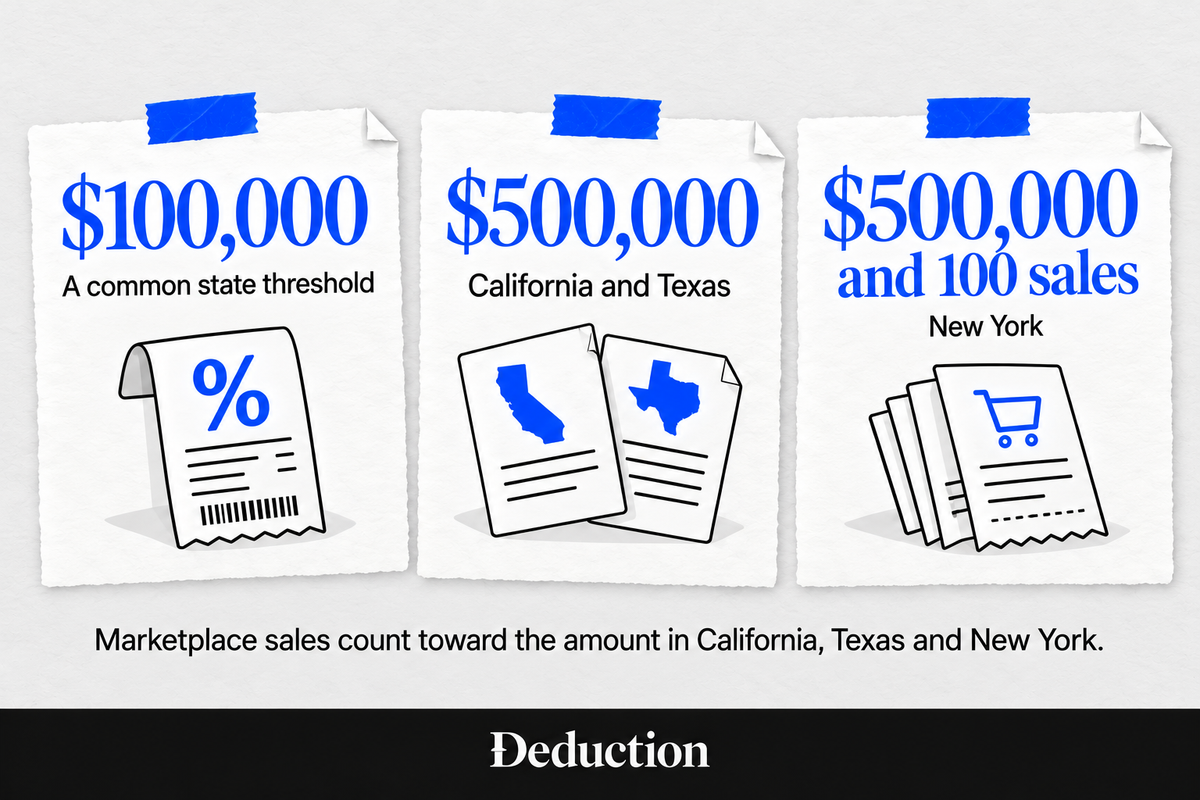
Since the Supreme Court's 2018 decision in South Dakota v. Wayfair, a state can require you to collect its tax once your sales into the state pass a set dollar amount. Some states also count orders, either as a separate test or alongside the dollar amount. This is called economic nexus.
The dollar amount is $100,000 in sales in many states and higher in some, such as $500,000 in California and Texas. In California, Texas and New York, sales you make through marketplaces count toward the amount, even though the marketplace collects the tax on them.
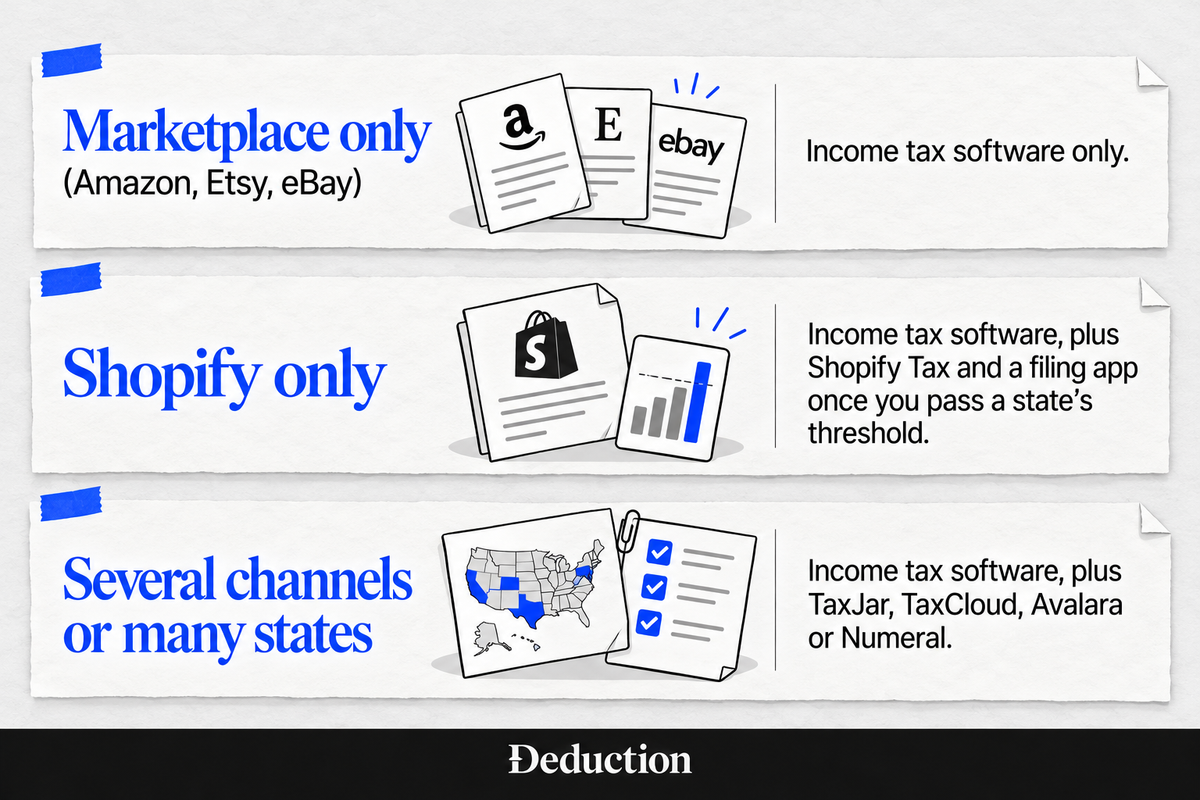
If you sell exclusively on marketplaces, you usually need income tax software and nothing else. If you also sell through Shopify or your own site and your sales pass a state's amount, you need both.
How to Choose Tax Software for Your Online Store
Pick the two kinds of software separately, starting with the one every owner needs. For your income tax return, check these four things:
- Inventory support: If you hold stock, make sure the software lets you report inventory and "cost of goods sold," what you paid for the items you sold that year, on Schedule C.
- 1099-K handling: Marketplaces and payment processors report your sales on Form 1099-K. Check whether the software imports these forms or has you type them in, and whether it handles more than one.
- Your business type: Schedule C covers a sole proprietor or, by default, a single-member LLC. If your store is a partnership, multi-member LLC or S corp, you need tax software for small businesses that also files Form 1065 or Form 1120-S, and the do-it-yourself tiers above are for personal returns only.
- How much review you want: Do-it-yourself software leaves every judgment call to you. If you want a tax professional to check the return, look for a review add-on or a service that includes one.
For sales tax, check these three:
- Channel connections: The tool should pull orders from every place you sell, such as your own store, Amazon and Etsy, into one report.
- Automatic filing: Some tools only calculate the tax. Others file and pay your state returns, usually for a fee per return or per state.
- Pricing that fits your states: Add up a year's cost for your actual number of states and filings. Per-filing pricing usually costs least when you file in only a few states, while per-state plans get expensive as you add states.
If you'd rather not handle sales tax at all, a managed service has its own team register you and file for you. Numeral works this way, and so does Zamp, which quotes each customer a custom price.
Do It Yourself or Hand Off Your Store’s Income Tax Return
Choosing between the income tax tools above comes down to how much professional oversight you want. Do-it-yourself software guides you through your return, but when something unusual comes up, such as inventory or sales in a new state, you decide how to report it on your own.
A CPA or other tax professional can answer those questions, but you often pay for the advice and again for the return, and getting time with one can be hard. Deduction combines the two for one yearly price, with tax questions answered all year and a CPA or licensed tax professional reviewing your return before it's filed.
Deduction is a tax filing service built around AI. It handles your income tax return, not sales tax filing, in three steps:
- Upload your documents: Add your 1099-Ks, platform payout reports and receipts to your Vault, or forward the emails they came in.
- Find what comes off: The AI tax deduction finder finds deductions you're eligible for, and Taylor, its AI tax agent, tracks business expenses such as platform fees and shipping and answers your questions.
- Get your return reviewed: A CPA or licensed tax professional reviews your return, you approve it, and Deduction files it.
Start by asking Taylor about your own 1099-K.
Frequently Asked Questions About Tax Software for Ecommerce
What Is the Best Sales Tax Software for Ecommerce?
It depends on where you sell. A store on a single platform may only need the tax tool built into that platform, and some are free up to a sales limit. A seller on several channels needs software that pulls in every channel's orders. Look for automatic filing in your states and pricing that fits how many states you file in.
Which Tax Software Is Best for Small Business Owners?
It depends on your business type and how much help you want. Sole proprietors can use a do-it-yourself tier with Schedule C, while a partnership or S corp needs software that files Form 1065 or 1120-S. For a professional check, Deduction prepares your return with AI and a CPA or licensed tax professional reviews it.
How Much Can I Sell Online Without Paying Tax in 2026?
No amount of business income is tax-free: your profit is taxable with or without a Form 1099-K. Marketplaces and payment apps send one when payments top $20,000 across more than 200 transactions, and card processors have no minimum. Net self-employment earnings of $400 or more also bring self-employment tax.
Do I Need to Collect Sales Tax on Shopify?
Yes, in states where you have nexus, such as through a location, employees or stored inventory there, or sales above the state's threshold. On your own store, registering, collecting and filing are your job. Shopify can charge the tax at checkout, but it doesn't file or pay it unless you're enrolled in its automated filing.
Is Sales Tax Software a Deductible Business Expense?
Yes. A subscription to sales tax software is an ordinary and necessary business expense (see IRS Publication 583) you can deduct on Schedule C, or on your S corp or partnership return. Software you buy outright is usually depreciated instead, though Section 179 or bonus depreciation can often let you deduct it in the first year.
Do I Need a CPA for My Ecommerce Taxes?
No. Many sole proprietors file with software. A professional helps most when the calls get harder, such as inventory, sales in many states, an S corp or a first year in business. Deduction sits in between, with AI preparing your return and a CPA or licensed tax professional reviewing it.
Can I Deduct Inventory as an Ecommerce Seller?
Yes, usually as cost of goods sold when the items sell, not when you buy them. If your average yearly gross receipts for the prior three years are $32 million or less in 2026 (Rev. Proc. 2025-32), you can use a simpler method, such as treating inventory like supplies deducted in the year the items go to customers.
What Business Expenses Can Ecommerce Sellers Deduct?
They include platform and payment fees, shipping, packaging, ads and software subscriptions. Under IRS Publication 587, if your home is the store's only fixed location, a separate space suitable for storage and regularly used for inventory can count despite some personal use. The guide to tax deductions for 1099 workers covers the home office deduction.
Do Ecommerce Sellers Need to Pay Estimated Taxes?
Yes, if you expect to owe at least $1,000 for 2026 after withholding and refundable credits and those won't meet the safe harbor for estimated taxes: 90% of this year's tax or 100% of last year's (110% at higher incomes). Payments are due April 15, June 15 and September 15, 2026, and January 15, 2027.
This article is general information, not tax advice. Sales tax rules vary by state, and your income tax return depends on how your store is set up, so check your situation with a CPA or licensed tax professional before you file. Software prices and features change often, so confirm current pricing with each vendor before you buy.