
Been using H&R Block, but it isn't hitting the spot, whether that's the cost or the kind of help you can get? It might be time to look at H&R Block alternatives.
H&R Block’s Free Online version covers about 52% of filers. You’ll need a paid plan if you itemize deductions or report self-employment income, rental income, stock sales, or a health savings account (HSA).
Once you're past it, you're paying for a tier: $65 to $130 online, plus $49 for each state. If you'd rather have an H&R Block tax pro do it, that starts at $99 plus $75 per state, and the final fee depends on the forms you need.
Each alternative below offers something H&R Block doesn’t or handles it at a lower cost. If you have a simple W-2 return, you may already qualify for H&R Block’s free filing option. The table also shows who prepares your return with each service so you can compare calibre by calibre.
Every option here offers federal tax filing for individuals, lists its prices publicly, and provides at least one feature or benefit H&R Block doesn’t. We checked each provider’s website for prices on October 9, 2026.
Disclaimer: Deduction is our own product. We cover its pros, cons, and pricing just as we do for every other option on this list.
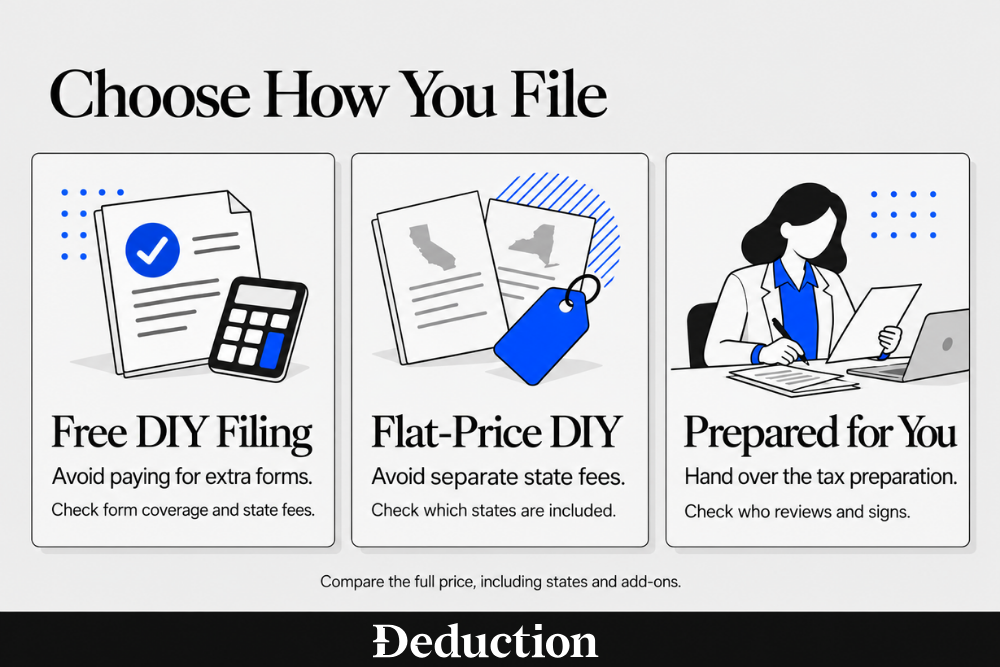
The first two are services plus software. They take the place of an H&R Block office or virtual tax pro: you hand over your documents, and the return gets prepared for a tax professional to sign off on.
Deduction
What it does that H&R Block doesn't: Has a CPA or tax professional review every return for one $499 yearly price, where H&R Block's tax pro fee depends on the forms you need and its tax pro certifications come from H&R Block's own training.
Taylor, Deduction's AI tax agent, tells you which documents it needs, prepares your return from the ones you upload, and lets you know if anything is missing. You can also ask it for tax advice all year.
A CPA or enrolled agent (an IRS-licensed tax professional) reviews the return, you approve it, and Deduction files it with the IRS and your state.
It's a good fit if you want a CPA or enrolled agent checking your return and someone to answer tax questions in July, not just in April. Our Deduction vs H&R Block comparison goes into more detail.
Pros
- One yearly price: The $499 Personal plan covers a year of questions plus your reviewed federal and state filing.
- Licensed review on every return: A tax professional or CPA checks every number and form before you approve the return.
- Year-round answers: You can ask Taylor tax questions in any month, including planning questions long after filing season.
- Accuracy guarantee: Deduction covers interest and penalties when an error is solely its mistake, and you gave accurate, complete, and timely information. It doesn't cover additional tax owed.
Cons
- Costs more for simple returns: While $499 is well above H&R Block's $99 starting tax pro fee, you can ask questions for free and pay only when you're ready to file or need a licensed tax professional to review a high-impact decision.
- Limited business returns: The $999 Simple Business plan covers simple solo S corps and small partnership LLCs.
Pricing
The Personal plan is $499 per year for deduction as AI Tax filing, and you pay when you're ready to file or when you need a licensed tax professional to review a high-impact decision. Simple solo businesses, such as an S corp or a small partnership LLC, are $999.
Keeper
What it does that H&R Block doesn’t: Includes a tax pro’s review and signature, plus up to two state returns, for $199 a year. H&R Block’s Self-Employed plan with Tax Pro Review costs $225, plus $49 per state.
Keeper is a yearly subscription built around tracking your expenses. You connect your bank and card accounts, its AI sorts deductible expenses as the year goes on, and at tax time it prepares your return for a tax pro to review and sign.
It's made for the freelancer or sole proprietor who only thinks about write-offs when the April interview asks for them.
Pros
- Pro-signed return: Every return is reviewed and signed by a tax pro before it's filed.
- Two states included: The Standard plan covers your federal return and up to two state returns.
- Automatic expense import: Expenses from your connected bank and card accounts get sorted as they happen.
- Business returns available: The Business plan files S corp and partnership returns.
Cons
- Rentals and K-1s cost more: You'll need the $399 Premium plan for rental property, K-1s, and investments.
- Fee-only guarantee: Keeper's terms limit refunds to your subscription fee and exclude taxes, interest, and penalties.
- No in-person help: Everything runs through the app and website, with no office to visit.
Pricing
The Standard plan is $199 a year for a federal return and up to two state returns. Premium, at $399 a year, adds rentals, K-1s, and investments.
The remaining six options are DIY tax programs, similar to H&R Block’s online and desktop software. You enter your information, and the software calculates your taxes and lets you file electronically.
Cash App Taxes
What it does that H&R Block doesn’t: Lets you file federal and state returns for free, even with self-employment income. H&R Block charges $65 to $130 for federal filing, depending on your business expenses, plus $49 per state for the same return.
Cash App Taxes is free filing software built into Cash App, a Block, Inc. brand. You pay nothing for federal or state returns, even ones with self-employment income or stock sales.
It’s a good fit if you earn W-2 wages or do gig work, paid to file with H&R Block last year, and feel comfortable entering your tax forms without professional help.
Pros
- Free federal and state: You pay nothing for either return, and there are no paid tiers to get bumped into.
- Self-employment included: You can report freelance and side-gig income without paying for an upgrade.
- Investments included: Returns with stock or bitcoin sales are free too.
Cons
- No tax pro help: There's no tax professional to ask. You work through every question on your own.
- Unsupported situations: Cash App Taxes keeps a list of forms and situations it doesn't support. Give it a look before you start.
- Cash App account required: You'll need the Cash App on your phone to sign in and use it.
Pricing
Federal and state returns are free, including returns with self-employment income. The only real cost comes if your situation isn't supported and you have to start over somewhere else.
FreeTaxUSA
What it does that H&R Block doesn’t: Includes self-employment income (Schedule C), capital gains and losses (Schedule D), rental income (Schedule E), and HSA reporting in its free federal filing. H&R Block’s Free Online version doesn’t cover these.
FreeTaxUSA is do-it-yourself software from TaxHawk and one of the IRS Free File partners. Federal filing is free in every situation it supports, including self-employment, rentals, stock sales, and HSAs.
It’s a good fit if you’re a freelancer or landlord who had to upgrade to a paid H&R Block plan to report business or rental income, and you’re comfortable filing without a tax pro and want a free option.
Pros
- Free federal for complex returns: Schedules C, D, and E and the HSA form (Form 8889) are all included in the $0 federal return.
- Imports H&R Block returns: You can upload a PDF of last year's return from H&R Block, TurboTax, or other programs, and your details carry over.
- Accuracy guarantee: If a calculation error in its software leads to penalties and interest, FreeTaxUSA pays them.
- Optional tax pro advice: If you get stuck, Pro Support adds calls or chats with a tax pro and a final review of your return.
Cons
- Paid state returns: Each state return costs extra, even though federal is free.
- No full-service option: A tax pro can answer your questions, but no one will prepare the return for you.
- No business returns: FreeTaxUSA only does individual returns. If you have a partnership or S corp return, you'll need to file it somewhere else.
Pricing
Federal returns are free, and state returns are $15.99 each. If you want extras, Pro Support is $64.99, and Audit Defense is $19.99.
Jackson Hewitt Online
What it does that H&R Block doesn’t: Charges a flat $25 for federal filing and all state returns, regardless of complexity. H&R Block’s price depends on the plan you need, with an extra $49 per state.
Jackson Hewitt Online is the do-it-yourself product from the Jackson Hewitt tax chain. Your tax prep fees top out at $25 total, state returns included, however complicated your return gets.
It’s a good fit if you file in two states and want to avoid H&R Block’s separate fee for each one. If you prefer in-person help, Jackson Hewitt also has offices, many inside Walmart stores.
Pros
- One flat price: Tax prep fees top out at $25 total, with every state return included.
- Schedules C, D, and E included: Self-employment, stock sales, and rental income are all on its supported forms list at the same price.
- Accuracy guarantee: Jackson Hewitt pays IRS interest and penalties caused by an error in its software.
- Offices as a backup: If your return gets more complicated, you can switch to an in-person Jackson Hewitt tax pro.
Cons
- Limited document import: You can upload your W-2, but you’ll need to enter most other forms by hand.
- No tax pro in the online price: The online product comes with live chat support, but help from a tax pro means moving to its in-office service.
- Paid add-ons: The $25 cap doesn't cover add-on services such as eCollect and Protection Plus.
Pricing
Tax prep fees are capped at $25 total, with $0 for state returns. Jackson Hewitt doesn't publish prices for its in-office tax pros.
TaxSlayer
What it does that H&R Block doesn’t: Includes business expenses and rental income in its $44.99 Classic plan. H&R Block requires its $105 Premium plan for rental income or its $130 Self-Employed plan for business expenses.
TaxSlayer is do-it-yourself software with four tiers, and it's one of the IRS Free File partners. Its Classic tier includes every schedule, so business expenses and rental income won't push you into a pricier version.
It works well for a rideshare driver or small landlord who doesn't want to pay for H&R Block's Premium or Self-Employed tier.
Pros
- Low-cost self-employed coverage: Classic handles Schedules C and E for $44.99, before state fees.
- Free for active-duty military: If you're on active duty, you can file a federal return on Classic for free, with state returns extra.
- Imports other providers' returns: You can upload a PDF of last year's Form 1040 from many other tax programs.
- Accuracy guarantee: TaxSlayer reimburses federal or state penalties and interest caused by a calculation error in its software.
Cons
- State fee on paid tiers: Each state return costs $47.99 on the paid tiers.
- Tax pro help costs more: Ask a Tax Pro only comes with Premium ($64.99) and Self-Employed ($74.99).
- No business returns: TaxSlayer doesn't do partnership or corporate returns (Forms 1065, 1120, and 1120-S).
Pricing
Classic costs $44.99 plus $47.99 per state. Simply Free costs nothing for a simple Form 1040 if you meet its age, income, and credit limits, and it includes one state return.
TaxAct
What it does that H&R Block doesn’t: Offers a $100,000 accuracy guarantee for returns you prepare yourself, including any refund shortfall or extra tax caused by a software error. H&R Block’s online guarantee covers penalties and interest up to $10,000.
TaxAct is do-it-yourself software with four tiers, and it's also an IRS Free File partner. If a software error changes your refund or tax bill, its guarantee pays you the difference, up to $100,000 in total.
It's the one to look at if you worry more about mistakes than about price. You can also add a tax pro through Xpert Assist or Xpert Full Service for a fee.
Pros
- Larger accuracy guarantee: On returns you prepare yourself, it covers a lost refund or extra tax caused by its error, plus penalties and interest, up to $100,000.
- Cheaper self-employed tier: Self-Employed costs $109.99, compared with $130 for H&R Block's Self-Employed tier.
- Prior-year PDF import: You can upload last year's return as a PDF to bring your details over.
- Business returns available: TaxAct sells separate products for partnership and S corp returns.
Cons
- High state fee: Each state return costs $64.99 on the paid tiers.
- Expert help costs extra: Adding a tax pro through Xpert Assist or Xpert Full Service means a fee on top of your tier.
- No in-person help: TaxAct is online and download only. There's no office to visit.
Pricing
Deluxe costs $59.99 plus $64.99 per state. Xpert Full Service, where a pro prepares the return for you, starts at $99 plus $69 for all states.
TurboTax
What it does that H&R Block doesn’t: Covers penalties and interest under its accuracy guarantee without a stated dollar limit. H&R Block’s online guarantee caps that coverage at $10,000.
TurboTax is Intuit’s tax software and H&R Block’s biggest competitor. You can prepare your own return, get live help through Expert Assist, or upload your documents and have an expert prepare your return through Expert Full Service.
It suits a complicated return when you want to start in the software but keep the option of handing it to a professional for a check and some advice. TurboTax also runs expert offices if you'd rather book an appointment in person.
Pros
- Expert hand-off: With Expert Full Service, an expert prepares and files your return from the documents you upload.
- Broad form coverage: Premium covers investments, rental property, and self-employment income in one tier.
- Imports H&R Block returns: TurboTax accepts a PDF of last year's Form 1040 from H&R Block and other providers.
- Accuracy guarantee: TurboTax pays IRS or state penalties and interest caused by a calculation error in its software.
Cons
- Higher DIY prices: Even at its early-season price of $79, Deluxe costs more than H&R Block's $65 Deluxe tier.
- Variable expert prices: Expert Assist and Full Service only show starting prices. Your final price depends on your forms.
- Narrow free tier: About 37% of filers qualify for Free Edition. It covers a simple Form 1040 with only a few credits.
Pricing
Deluxe was posted at $79 and Premium at $139 for a federal return, both for returns filed by March 31, and TurboTax charges more later in the season. State returns cost extra, and the state price isn't listed on the product pages.
How to Choose an H&R Block Alternative
Start with whatever pushed you away from H&R Block, then compare the full price of each option with your state returns and add-ons included. Here's how the most common reasons line up with what to look for:

To compare prices fairly, add up the federal fee, each state fee, and any add-ons you'd use. A free federal return can end up costing more than a flat-fee product once state returns are added.
H&R Block may still be a good fit if you qualify for Free Online or prefer to hand your documents to a tax pro in person. Free Online costs nothing, and most alternatives on this list don’t offer office appointments.
How to Switch From H&R Block Without Losing Last Year's Return
Before switching from H&R Block, download a complete copy of last year’s tax return. Your new software or preparer can use it to bring over your tax details. It also includes your prior-year adjusted gross income (AGI), which you may need to verify your identity when you e-file.
Here's how to do it:
- Download last year's return: Sign in to your H&R Block account, open your prior years, and save the return. If you used Free Online, you may need to pay a small fee for access, and office clients can download the past three years in their MyBlock account.
- Note your prior-year AGI: Your adjusted gross income (AGI) is your total income minus certain adjustments. To validate an e-filed return, the IRS checks last year's AGI or your prior-year Self-Select PIN, and an IP PIN replaces both. Your IRS Online Account or a free transcript also shows your AGI.
- Pull out the carryovers: Look for a capital loss you couldn't fully deduct, depreciation on a rental or business asset, and unused credits. You can deduct up to $3,000 of net capital losses a year ($1,500 if married filing separately) and carry the rest forward, and a dropped depreciation schedule is a common miss when you change software.
- Import the PDF or hand it over: Most of the do-it-yourself programs above can import a PDF of last year's Form 1040, and a new preparer will ask for the same copy. Before you file, compare the two returns for anything that disappeared.
<IMAGE 4 of 4, PROCESS FLOW, 1200x800: Four connected paper-note cards on EDEDED, left to right: Download last year's return, Note your prior-year AGI, Pull out the carryovers, Import the PDF. Electric-blue arrows between cards. Deduction wordmark footer bar.>
Get a CPA or Enrolled Agent Review and Year-Round Answers for One Price
An H&R Block tax pro's quote starts at $99, then grows with the forms and states your return needs. Add a rental or a side business, and the quote usually goes up with it.
Deduction charges an annual price rather than charging by the forms you need, with year-round tax advice included. Taylor, its AI tax agent, guides you through your return, and an enrolled agent or CPA reviews it before filing. Here’s how it works:
- Upload your documents: Add W-2s, 1099s, last year's return, and statements to your Vault, forward emails, or let Taylor pull some in automatically.
- Taylor prepares your return: It finds the deductions and credits that apply to you, asks about anything unclear, and answers your tax questions all year.
- A CPA or enrolled agent reviews and files: A licensed tax professional checks every number and form, and once you approve the return, Deduction files it with the IRS and your state.
You can ask Taylor questions and upload documents for free. You pay when you're ready to file or need a licensed tax professional to review a high-impact decision, and the Personal plan is $499 a year.
Frequently Asked Questions About H&R Block Alternatives
Who Is H&R Block's Biggest Competitor?
TurboTax, made by Intuit, is generally seen as H&R Block's biggest competitor. Both sell do-it-yourself software with paid tiers, expert help as an add-on, and in-person offices. TurboTax's do-it-yourself tiers usually cost more.
How Much Does H&R Block Charge, and Why Is It So Expensive?
For 2025 returns, H&R Block's online tiers run from $0 to $130, the paid tiers add $49 per state, and a tax pro starts at $99 plus $75 per state. The price climbs as your return needs more forms. Rentals and stock sales move you up to Premium, and business expenses move you to Self-Employed.
Is H&R Block's Free Filing Really Free?
Yes, if your return fits it. H&R Block says about 52% of filers qualify for Free Online, which covers a simple Form 1040 with a few credits. Itemized deductions, self-employment income, rentals, stock sales, and HSAs all require a paid tier.
What Was the FTC's Case Against H&R Block?
In 2024, the Federal Trade Commission alleged that H&R Block deleted customers' data when they downgraded to a cheaper product and marketed free filing deceptively. A January 2025 final order required it to pay $7 million, stop deleting data on downgrades, and disclose how many filers qualify for its free products.
Is It Better to Go to a CPA or H&R Block?
It depends on how complex your return is. CPAs, enrolled agents, and attorneys have unlimited rights to represent you before the IRS, and H&R Block says its tax pros may not be licensed accountants. A CPA usually costs more, so H&R Block often works fine for simpler returns.
Is FreeTaxUSA Better Than H&R Block?
On price, it often is. FreeTaxUSA's federal return is free even with self-employment, rental, or investment income, while H&R Block charges $65 to $130 for those situations. H&R Block offers in-person tax pros, though, and FreeTaxUSA doesn't.
Is TurboTax or H&R Block Better?
Neither is better for everyone. TurboTax's do-it-yourself tiers usually cost more, such as $79 for Deluxe against H&R Block's $65, and both let an expert prepare your return online. TurboTax's guarantee lists no dollar cap on penalties and interest, while H&R Block's online guarantee stops at $10,000.
This article is general information, not tax advice. Prices and features change, so confirm current pricing with each vendor, and check your own situation with a CPA or qualified tax professional before you file.