
Finding the best tax software for small businesses starts with the return your business files. In practice, a freelancer or single-member LLC reports business income on Schedule C with a personal return, while a partnership or corporation files its own business return.
Most tax software is built for sole proprietors who file Schedule C. If your business files its own return, check the forms a product supports before you buy: consumer software may stop at Schedule C, business editions often require Windows, and state returns can cost extra.
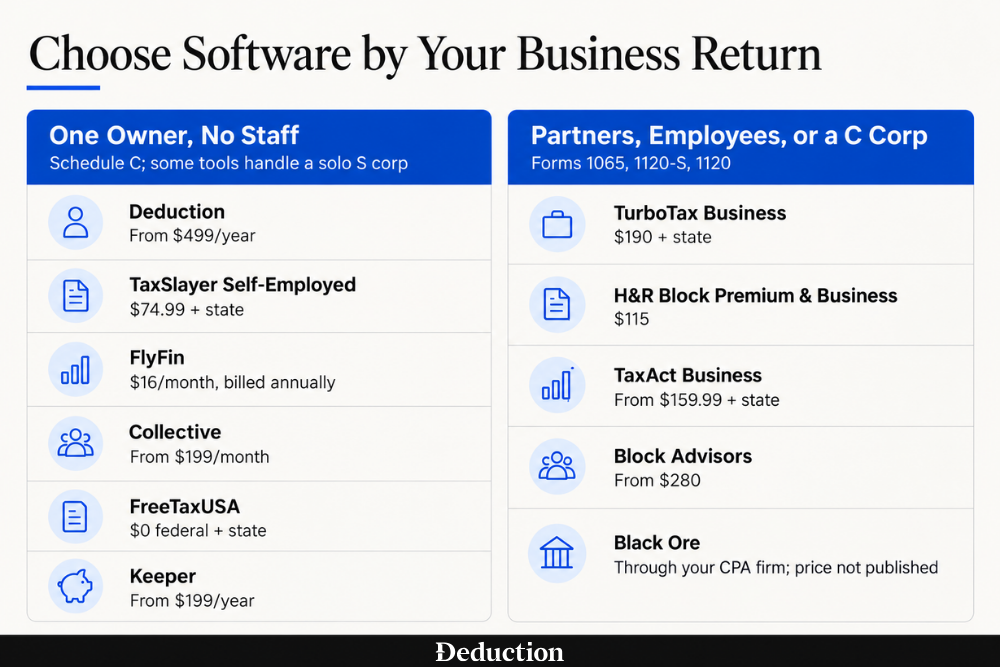
This guide sorts 11 options into two groups: tools for freelancers and one-owner businesses, and software for partnerships, corporations, and companies with employees. Each entry covers who it suits, what it costs, and who does the work.
Source: Vendor pricing and product pages, checked September 25, 2026. Prices are for 2025 returns filed in 2026 and exclude optional add-ons. Expect new pricing when the 2026 filing season opens.
Tax Software for Freelancers, Sole Proprietors, and One-Owner Businesses
These tools mainly serve sole proprietors and single-member LLCs filing Schedule C. Some also handle solo S corps or small partnerships. If you have employees beyond yourself or file as a C corporation, start with the next group.
A separate roundup of the best self-employed tax software compares more tools for Schedule C filers.
Deduction
Best for: Sole proprietors and W-2 earners with a side business who want year-round answers and a CPA-reviewed return.
Deduction is an AI tax-filing software for small businesses built around Taylor, CPAI, that answers tax questions and provides planning advice year-round. It prepares personal returns with W-2 and 1099 income, Schedule C, Schedule E, and K-1s, plus simple S corps and small partnership LLCs.
At tax time, you upload your documents to its Vault, and it prepares your federal and home-state returns. A licensed CPA reviews every return before it's filed.
Pros
- Year-round answers: Taylor answers tax questions quickly, well outside filing season and after business hours.
- Simple document upload: Getting your paperwork into the Vault takes less effort than a traditional firm's intake process.
- AI checked by a CPA: A licensed CPA reviews the AI's work before anything goes to the IRS.
- Cheaper than a firm: The flat yearly fee often costs less than what a traditional accounting firm charges.
Cons
- Steep single payment: A $499 or $999 payment is a lot to hand over at once. You can ask questions free and pay only when you file or need a licensed tax professional to review a high-impact decision.
- No multi-employee corporations: Deduction doesn't handle S corps with several employees or C corps. Its business plan covers a simple solo S corp or a small partnership LLC.
- Simpler returns only: Deduction currently files your federal return and one state return for where you live. It doesn't take returns with stock compensation, significant capital gains or loss harvesting, foreign accounts, amendments, or open IRS notices or audits.
Pricing
The Personal plan costs $499 a year and includes year-round questions, CPA-reviewed federal and state filing, and an accuracy guarantee. The Simple Business plan costs $999 for a simple solo S corp or a small partnership LLC.
TaxSlayer Self-Employed
Best for: Sole proprietors who prepare their own Schedule C and want self-employment guidance from a tax pro.
TaxSlayer is low-cost online software for individual tax returns. Its Self-Employed tier includes everything in the Premium tier, such as priority support and Ask a Tax Pro, and adds tax pros with self-employment experience.
At tax time, you prepare the return yourself, with extra guidance on 1099 income and Schedule C. The tier also sends reminders for quarterly estimated payments during the year.
Pros
- Guided interview: The step-by-step questions are easy to follow, even for a first business return.
- Lower total cost: It often costs less than the self-employed tiers from the biggest brands.
- Quick repeat filing: Your prior-year information carries forward. That makes next year's return faster to finish.
- Helpful phone support: Support agents tend to stay with a problem until it's solved.
Cons
- Upgrade pressure: The software can push you into a higher tier than you need. Fees can't be refunded once you print or file.
- No full preview: You may not be able to see the complete return until you've paid.
- No business entity returns: TaxSlayer doesn't prepare partnership or corporate returns. It only enters the K-1s those businesses send you.
Pricing
Self-Employed costs $74.99 for a federal return, and each state return adds $47.99. The Classic tier, at $44.99, already includes Schedule C, and Premium, at $64.99, adds priority support and Ask a Tax Pro.
FlyFin
Best for: Freelancers who want a CPA to prepare and file their return.
FlyFin is a tax app for freelancers and the self-employed. It connects to your bank and card accounts, sorts expenses to find 1099 tax deductions, and calculates your quarterly estimated taxes.
When filing, a CPA prepares your federal and state returns, you review and e-sign them, and the CPA e-files them. FlyFin says its CPAs also prepare returns for S corps, C corps, and multi-member LLCs.
Pros
- Responsive CPAs: The CPAs tend to answer questions quickly through the app.
- Automatic expense sorting: Linked-account scanning sorts your spending and flags deductions you might have missed.
- Done-for-you filing: A CPA prepares and files the return. You answer questions and review it instead of working through a tax interview.
- Quarterly tax help: The estimated payment calculations help you plan what to set aside.
Cons
- Unclear total cost: Fees for business or complex returns aren't always clear from the plan you choose.
- Slow in peak season: Replies can slow down near deadlines, and FlyFin doesn't publish a phone number.
- Confusing navigation: The app can be hard to move around in.
Pricing
The Standard plan is posted at $16 a month billed annually, and Premium, which adds S corps and other entities, is posted at $29 a month, both shown as limited-time discounts. FlyFin says the exact price for your return appears in its app, and its terms mention separate filing fees.
Chgeck out this article comparing Deduction vs Fly Fin tax get into more detail.
Collective
Best for: One-person businesses that want S corp setup, payroll, bookkeeping, and taxes in one membership.
Collective is a membership for one-person businesses that combines bookkeeping, tax filing, and S corp setup. The S Corp plan files your S corp election, runs owner payroll through Gusto, and prepares Form 1120-S.
At tax time, Collective or a third-party preparer handles your returns. The LLC plan includes your personal return with Schedule C, and the S Corp plan sells it as an add-on from $399 a year.
Pros
- Knowledgeable staff: Account managers and tax staff are generally patient and helpful.
- S corp handled for you: The election, payroll setup, and business return are all taken care of by one provider.
- Late election help: If you missed the deadline to elect S corp status, Collective offers a late-election service.
- Easy dashboard: The platform is simple to use from day to day.
Cons
- Hard to reach a person: Replies can be slow, and the person handling your account may change often.
- Bookkeeping and payroll errors: Books can fall behind or contain mistakes. Payroll or election errors have led to unexpected tax bills in some cases.
- One-owner businesses only: Collective doesn't offer partnership or C corp returns. It's built for a business with a single owner.
Pricing
The S Corp plan costs $349 a month, or $3,560 a year when billed yearly, and the LLC plan costs $199 a month. Catch-up bookkeeping for earlier months costs $99 for each month of records.
FreeTaxUSA
Best for: Sole proprietors with a simple Schedule C who want the lowest cost.
FreeTaxUSA is low-cost DIY software for individual tax returns. Its free federal return includes Schedule C, self-employment tax, depreciation, and the home office form.
During tax submission, you work through the interview on your own. Paid add-ons cover priority support, calls with a tax pro and a final review, and audit defense.
Pros
- Free federal return: Schedule C and self-employment tax are included at no charge.
- Cheapest paid state filing: Its state return costs less than any other product here that charges separately for one.
- Fast for simple returns: The interview moves quickly when your return is uncomplicated.
- Free carryover: If you filed with FreeTaxUSA last year, your information carries forward at no charge.
Cons
- Limited free support: Help without a paid add-on is mostly by email and can be slow. Live chat comes with the Deluxe add-on.
- Errors that need amending: Mistakes on multi-state or brokerage items can take an amended return to fix.
- Schedule C only: FreeTaxUSA doesn't prepare partnership or corporate returns.
Pricing
The federal return is free, and each state return costs $15.99. Deluxe, at $7.99, adds priority support, live chat, and unlimited amended returns.
Keeper
Best for: Freelancers who want expenses tracked from their bank accounts all year.
Keeper is a bookkeeping and tax filing app for freelancers and small business owners. It links to your bank and card accounts, and AI sorts your transactions into tax deductions that carry into your return.
A tax pro reviews and signs your return before it's filed. The Business plan adds S corp and partnership returns prepared by Keeper's tax experts.
Pros
- Automatic deduction tracking: Linked-account sorting surfaces write-offs you might otherwise miss.
- Mixed income made simple: Filing stays simple when you have W-2 wages alongside 1099 or gig income.
- Helpful tax pros: Calls with the tax pros tend to be clear and informative.
- Entity returns available: The Business plan covers S corp and partnership returns for businesses with up to five members.
Cons
- Billing surprises: Charges after a free trial or an automatic renewal can come as a surprise. Keeper may refund you if you cancel within a month of your first term, but not after that.
- Hard to reach a human: Support starts with an AI assistant, and replies from a person can be slow.
- Narrow guarantee: Keeper's terms limit its guarantee to refunding the subscription fee. They exclude any additional tax, penalties, or interest.
Pricing
The Standard plan costs $199 a year for federal filing and up to two state returns, and Premium costs $399 a year. The Business plan, which adds S corp and partnership returns, costs $1,199 a year.
Tax Software for Partnerships, Corporations, and Businesses With Employees
If your business files its own return, check for the right form: 1065 for a partnership or multi-member LLC, 1120-S for an S corporation, or 1120 for a C corporation. Three options here let you prepare that return yourself, while Block Advisors has a tax pro do it. Black Ore is different: accounting firms use it to prepare owners’ personal returns with K-1s.
TurboTax Business
Best for: Partnerships and corporations that prepare their own return on a Windows PC.
TurboTax Desktop Business is Intuit's download software for business returns, including Form 1065, Form 1120-S, Form 1120, and Form 1041 for trusts and estates. It runs only on Windows 11.
When filing, you work through a guided interview yourself. Intuit's online Expert Assist and Full Service business tiers add an expert, but they don't cover C corps, trusts, or estates.
Pros
- Guided interview: The step-by-step questions are workable for owners who aren't accountants.
- Several entities, one purchase: One license can cover returns for more than one business, with five federal e-files included.
- Accuracy guarantee: Intuit's accurate calculations guarantee applies to its business returns.
- Payroll forms included: Quick Employer Forms creates and e-files W-2s and 1099s for your workers.
Cons
- Windows 11 only: There's no Mac version, and the software won't install on earlier versions of Windows.
- Price and extras: The price tends to rise each year, and state returns are sold separately.
- No built-in expert help: Live tax advice isn't available with the desktop product. You'd need one of Intuit's online expert tiers for that.
Pricing
TurboTax Desktop Business 2025 costs $190 with five federal e-files, and each state download costs $55 more, including one state e-file. Intuit's desktop pricing page already lists $194 under its tax year 2026 prices.
H&R Block Premium & Business
Best for: Owners who want business and personal returns in one low-cost Windows package.
H&R Block Premium & Business is download software that pairs H&R Block's personal tax program with a business program for partnership, corporate, and trust and estate returns. It runs only on Windows 11 and includes one state program.
You prepare the business return and your personal return yourself at tax time. The package includes AI Tax Assist, a chat assistant for tax questions as you work.
Pros
- Two returns, one price: One purchase covers the business return, your personal return, and a state program.
- K-1s carry over: K-1 figures from the business return can flow into your personal return.
- Unlimited business returns: The package includes unlimited business returns, with five federal e-files shared across your personal and business returns.
- Easy personal side: The personal-return interview is easy to follow.
Cons
- Install and bug problems: Installs can fail, and some error checks in the business program can't be overridden.
- Limited business state e-file: You can e-file business state returns in only six states. Everywhere else, you print and mail them.
- Audit support excludes business: Its software audit support covers your individual return, not the business return.
Pricing
Premium & Business costs $115 and includes one state program. State e-filing costs $19.95 per state outside New York.
Black Ore
Best for: Owners with K-1-heavy personal returns whose accounting firm prepares their taxes.
Black Ore is AI tax software sold to CPA and accounting firms rather than to taxpayers. Its Tax Autopilot sorts documents, extracts data, fills in forms and workpapers, and flags unusual items.
It prepares individual returns using data from each K-1 and K-3 a client receives. The firm's CPAs approve the return in Black Ore, then export it to their own tax software to file.
Pros
- Built for K-1s: Its K-1 and K-3 automation targets individual returns with many partnership and S corp statements.
- CPAs keep sign-off: The firm's professionals review and approve every return, and Black Ore keeps an audit trail of its work.
- Fits existing software: Prepared data exports straight into major professional tax software. Nobody has to rekey it.
Cons
- Firms only: You can't buy Black Ore yourself. It only helps you if your accounting firm uses it.
- Limited business returns: It doesn't list S corp or C corp returns. Its product menu still marks partnership automation as coming soon, though a 1065 plan appears on its pricing page.
- Does not file taxes: Black Ore does not file taxes. It hands your firm a prepared return. The firm then files it through its own tax software.
Pricing
Black Ore doesn't publish prices, and every plan on its pricing page says to request pricing. Plans are sold per module, such as 1040 or K-1, with an Enterprise plan for high-volume firms.
TaxAct Business
Best for: Owners who want to prepare a partnership or corporate return online.
TaxAct sells separate business products for Form 1065, Form 1120-S, Form 1120, and Form 1041, both online and as Windows downloads. Each product prepares one federal business return.
At tax time, you work through the business interview yourself, and it allocates K-1s to each partner or shareholder. Paid Xpert Assist adds help from a tax expert on partnership and S corp returns.
Pros
- Online business returns: You can prepare a partnership or corporate return in a browser, including on a Mac.
- Clear entity guidance: The partnership and S corp interviews are easy to follow.
- Business and personal bundles: You can buy the business return bundled with your personal Form 1040.
- Prior-year carryover: Last year's figures carry forward into this year's return.
Cons
- Upsells and surprise totals: Add-ons can push the final price higher than you expect.
- K-1 entry problems: Entering K-1s that report more than one activity can trigger error loops.
- Hard-to-reach support: Reaching a person can take a long wait, and customer care doesn't include tax advice.
Pricing
The online partnership product costs $159.99, and the S corp and C corp products cost $169.99 each, plus $69.99 per state. Each product covers one federal return, and a second business needs its own purchase.
Block Advisors
Best for: Owners who want a tax pro to prepare the business return, in person or virtually.
Block Advisors is H&R Block's small business service, run virtually and through participating offices. It offers business tax preparation, bookkeeping, payroll, and help forming a business.
A tax pro prepares your S corp, C corp, partnership, or sole proprietor return. Tax pro preparation always includes a business structure analysis and a profit and loss statement.
Pros
- Main entity types covered: It prepares S corp, C corp, partnership, and sole proprietor returns.
- In person or remote: You can meet a pro at a participating office, work from home, or drop off your documents.
- Books and payroll too: The same provider can keep your books and run payroll during the year.
- Knowledgeable pros: The tax pros tend to be thorough and good at explaining their work.
Cons
- Starting prices only: Fees are listed as "starting at." The final price depends on how complex your return is.
- Varies by office: Quality can vary from one office or preparer to the next.
- Certification isn't a license: The "small business certified" label is H&R Block's own training certification. It isn't a CPA or EA credential.
Pricing
Tax pro preparation of an S corp, C corp, or partnership return starts at $280, and self-employed returns start at $250 plus $75 per state. Full-service bookkeeping starts at $189 a month plus a $100 setup fee, and payroll starts at $59 a month plus a $50 setup fee.
Which Tax Return Does Your Small Business File?
The return your business files decides which software can prepare it. Here's how the IRS treats the common setups:
- Sole proprietor or single-member LLC: By default, the IRS treats a single-member LLC as part of its owner, so business income and expenses usually go on Schedule C with your Form 1040. Personal tax software handles this, often in a self-employed tier.
- Partnership or multi-member LLC: An LLC with two or more members is taxed as a partnership by default. It files Form 1065 and sends each owner a Schedule K-1 showing their share.
- S corporation: The company files Form 1120-S, and income passes through to the owners on Schedule K-1s. An LLC that elects S corp status files this return too.
- C corporation: The company files Form 1120 and pays tax on its own profit.
Personal tax software can enter a K-1 you receive, but it usually can’t prepare the business return that produced it. To file Form 1065, 1120-S, or 1120, you’ll need business tax software or a tax professional.
How to Choose Small Business Tax Software
Here's what to check before you pay for any of them:
- The return you file: Match the product to your business first. Software that stops at Schedule C can't prepare a partnership or corporate return, however good its interview is.
- Doing it yourself or handing it off: DIY software costs the least, but you make every judgment call yourself. AI-only tax filing leaves the same calls open. Check whether a person reviews or prepares the return before it's filed.
- The full price: State returns, extra e-files, expert help, and your personal return are often separate charges. Add them up before you compare starting prices.
- Your computer: None of the desktop business programs here has a Mac version, and two of them need Windows 11. On a Mac, you need an online product or a service.
- Payroll and 1099s: If you pay employees or contractors, check whether W-2s, 1099s, and payroll tax forms are included or need a separate tool.
- Help during the year: Estimated payments, an S corp salary, and major equipment purchases can affect your taxes before filing season. Check whether the tool helps you make those decisions while there’s still time to act.
Let Deduction Plan and File Your Taxes as a Small Business Owner
Most small business owners aren't choosing between two software packages. They're choosing between doing the return themselves and paying an accountant to do it, and each option has a cost.
DIY software walks you through the forms, but you still have to make the tax decisions. How much of your car or home use qualifies as business use? Can you deduct new equipment this year, or must you spread the cost over several years? Have you paid enough in estimated taxes?
An accountant can help answer those questions, but that help adds to the cost.
Deduction is an AI tax assistant that works through those questions with you during the year, and a licensed CPA reviews your return before it's filed.
It prepares personal returns for sole proprietors, W-2 earners with a side business, and owners who receive a K-1, filed in the state where you live. Its Simple Business plan also covers simple solo S corps and small partnership LLCs. Here's how it works:
- Upload your records: Add 1099s, bank statements, last year's return, and business documents to your Vault, or forward them by email.
- Taylor works through your taxes: Taylor, CPAI helps you track business expenses, finds the deductions and credits you qualify for, and answers planning questions as they come up.
- A CPA reviews and files: A licensed CPA checks every number and form, and once you approve the return, Deduction files it with the IRS and your state.
You can ask Taylor questions for free all year. You pay only when you're ready to file or need a licensed professional to review a high-impact decision.
This article is general information, not tax advice. Tax rules, software prices, and features change, so confirm current pricing with each vendor and check your own situation with a CPA or qualified tax professional before you file.
Frequently Asked Questions About Small Business Tax Software
What Is the Best Tax Software for a Small Business?
It depends on the return your business files. A sole proprietor, or a single-member LLC that hasn't elected corporate tax treatment, needs software that prepares Schedule C. A partnership or corporation needs a program or professional that prepares Form 1065, 1120-S, or 1120. Deduction fits sole proprietors who want year-round answers and a CPA-reviewed return.
Can I Use Personal Tax Software for My LLC?
Yes, if it's a single-member LLC with default tax treatment. The IRS disregards it as separate from you, so business income usually goes on Schedule C with your Form 1040. A multi-member LLC is taxed as a partnership by default and files Form 1065, which personal software can't prepare.
Do I Need Separate Software for My S Corp and My Personal Return?
Usually, yes. Your S corp files Form 1120-S, and your share of its income arrives on a Schedule K-1 that goes on your personal return. Some business packages include the personal return, and a service that prepares both saves you from moving figures between programs.
Is Tax Software Deductible for a Small Business?
Yes, for the business part. As a sole proprietor, you can deduct on Schedule C the cost of preparing the part of your tax return that relates to your business, according to IRS Publication 334. Keep the receipt with your business records.
Should I Use Tax Software or Hire a Tax Professional?
Software works well for a simple Schedule C you're comfortable preparing. A professional is worth considering when you file a business return for the first time, have employees, or face a decision such as an S corp election. For sole proprietors, a CPA-reviewed service such as Deduction sits between the two.