
You collected rent all year, replaced a water heater in March, drove out to the property half a dozen times, and now all of it has to land on a Schedule E.
The receipts are spread across an email inbox, a drawer, and two bank accounts. You’re not sure whether that heater counts as a repair or an improvement, and depreciation is a number you’ve been meaning to work out since you bought the place.
Tax software for rental property solves different parts depending on which one you pick. Some keep your books clean all year, some hand your accountant a finished Schedule E, one prepares and files the return for you, and one lets you prepare and e-file it yourself.
At a Glance
Here’s a quick table to see what software fits for your rental property situation:
Deduction
Best for: Landlords who want their Schedule E prepared, reviewed by a CPA, and filed for them.
Deduction is an AI tax service for individuals, built around an AI tax accountant called Taylor that reads the documents you upload, finds deductions, and prepares your federal and state return.
A licensed CPA reviews everything before it goes to the IRS. Rental income, depreciation, and Schedule E are part of what it handles. It’ll also take your W-2 income, investments, stock options, crypto, and K-1s on the same return.
Features
- AI document review: Taylor reads what you upload, from W-2s and 1099s to K-1s and receipts, and pulls the numbers onto the right lines.
- CPA review before filing: A licensed CPA checks the return before it’s submitted. Nothing gets filed without a human check.
- Year-round questions: You can ask tax questions at any point in the year rather than only in the weeks before the deadline.
- Document vault: Uploads stay in a secure vault. Last year’s paperwork is still there when this year’s return needs it.
Pros
- Someone else does the filing: You hand over documents and a prepared, CPA-reviewed return goes to the IRS, which most tools on this list can’t do at all.
- Free until you file: You can open an account, upload documents, and ask unlimited questions at no cost. Payment comes due when you file, or earlier if you want a licensed tax professional to review a high-impact decision.
- Depreciation handled for you: Depreciation on your rental property is worked out as part of the return rather than left for you to track year to year.
- No per-form upgrades: The annual fee covers federal and state filing plus advice all year, whatever forms your return happens to need.
Cons
- Steep single payment: Several hundred dollars is a lot to hand over in one payment. You can upload documents and ask questions for free, and pay only when you file or when you want a CPA to weigh in on a big decision.
- Not a bookkeeping or rent collection system: It prepares the return rather than collecting rent or tracking expenses through the year, so most landlords with several units will pair it with a bookkeeping tool.
- Built for individual returns: It’s built around your personal return, with simple solo entities like an S corp or partnership LLC on a $999 tier. Multi-employee S corps and C corps aren’t supported at all.
Pricing
Deduction charges $499 a year for a personal return, which covers CPA-reviewed federal and state filing plus questions all year.
Stessa

Best for: Landlords who want free bookkeeping and bank syncing across an unlimited number of properties.
Stessa is a rental property finance platform that connects to your bank and card accounts, sorts the transactions into rental categories, and builds dashboards and reports from them. It also collects rent and holds cash in accounts that earn interest. Its free tier isn’t capped by property count, and it produces a tax package for whoever files your return.
Features
- Automatic bank feeds: Connected bank and card accounts pull transactions in on their own. Nothing gets typed in twice.
- Receipt scanning: The mobile app reads a photo of a receipt and fills in the details, capped at five scans a month on both Essentials and Manage. Only Pro is unlimited.
- Rent collection: Tenants can pay by autopay. Reminders and late fees are handled for you.
- Schedule E report: The accountant tax package adds a Schedule E from the Manage tier up, and Pro adds capital expenditure detail on top. Essentials gets a basic package only.
Pros
- Free plan with unlimited properties: The free tier isn’t limited by property count, which makes it a rare fit for someone with several small rentals and no budget.
- Quick to set up: Connecting accounts and getting a first dashboard takes very little time, and there’s not much to learn before it’s useful.
- Bank syncing saves real time: Pulling transactions in automatically removes most of the spreadsheet work landlords otherwise do by hand.
- Output a preparer can use: The tax package arrives in a form an accountant can work from directly instead of a pile of statements.
Cons
- Slow support: Getting a real answer can take a long time, and some users describe being sent canned links and videos in place of a reply. Live phone support sits on the Pro tier only.
- Bank sync breaks: Imported transactions go missing or arrive twice, and connections need re-authorizing more often than they should.
- Does not file taxes: It builds the reports and stops there, so you or your preparer still have to file the return.
Pricing
Stessa’s Essentials plan is free, and paid plans start at $12 a month billed annually, which is the level where the Schedule E report and lease templates appear. Pro runs $28 a month billed annually and adds unlimited receipt scanning, advanced reports, and phone support.
AppFolio
Best for: Property management companies running at least 50 units.
AppFolio is property management software for companies that run other people’s buildings. It brings leasing, maintenance, resident and owner communication, and accounting into one system, with built-in AI that handles maintenance intake, follow-up, and vendor coordination.
The accounting produces owner statements and year-end reports, and it prepares 1099s. None of it is built around your own return.
Features
- Unified accounting: Every transaction lands in one centralized database. Owner statements and portfolio reports come out of the same set of books.
- Leasing and marketing: Vacancies syndicate to listing sites in one step, and applications and screening run inside the platform.
- Maintenance automation: Built-in AI handles work order intake, follow-up, and vendor coordination without a person routing each request.
- Resident and owner portals: Residents, owners, and investors each get a portal for payments, requests, and updates.
Pros
- Runs the whole operation: Leasing, maintenance, communication, and accounting sit in one place, so a management company isn’t stitching four tools together.
- Little training needed: The interface is plain enough that new staff and tenants pick it up without a long onboarding.
- Complete record of communication: Messages with residents, owners, and vendors are all logged. That matters when a dispute turns on who said what.
- Mobile inspections: Inspections can be done from a phone with photos attached straight to the record.
Cons
- 50-unit minimum on the entry plan: The Core plan carries a 50-unit floor plus a minimum monthly spend, and the higher tiers list unspecified minimums, which rules the whole platform out for individual landlords.
- Support has thinned out: Some users describe a harder time reaching a person now that chatbots handle the first line, and lighter onboarding help than the platform used to offer.
- Does not file taxes: It’s a management and record-keeping system with no tax filing function, so your Schedule E is somebody else’s job entirely.
Pricing
AppFolio publishes no prices, and every path on the pricing page ends in a quote request after a demo.
You get a bundle-by-bundle feature comparison and a footnote saying a minimum spend and a 50-unit minimum apply to the entry-level Core plan, with unspecified minimums on Plus and Max. Budget for a sales conversation rather than a sign-up form.
REI Hub

Best for: Landlords who want real double-entry bookkeeping organized around Schedule E categories.
REI Hub is bookkeeping built specifically for rental property. Its chart of accounts is preconfigured to match Schedule E categories, it splits each mortgage payment into principal, interest, and escrow on its own, and it tracks fixed assets with their accumulated depreciation.
Reports run at portfolio, property, or unit level, and it ties in closely with TurboTenant for rent collection.
Features
- Schedule E chart of accounts: Categories are set up to match the lines on Schedule E, so the year-end report doesn’t need re-mapping.
- Automated mortgage accounting: Each payment is split into principal, interest, and escrow without you working out the split.
- Fixed asset and depreciation tracking: Assets are logged with their accumulated depreciation. This is the piece landlords most often lose track of.
- Property-level reporting: Profit and loss, cash flow, and balance sheet reports run for the whole portfolio or for a single unit.
Pros
- Built around the tax form: Because the categories mirror Schedule E, the year-end report is already close to what your preparer needs.
- Real accounting underneath: This is double-entry bookkeeping with a balance sheet, not an expense log with a nice dashboard.
- Depreciation is tracked: Fixed assets carry their accumulated depreciation forward.
- Works inside TurboTenant: If you already collect rent through TurboTenant, the two behave close to one system.
Cons
- Steep learning curve: There’s a lot of accounting machinery on display. Expect the first few weeks to be setup.
- Cost scales with doors: Pricing moves up in unit brackets, and each separate portfolio carries its own subscription.
- Does not file taxes: It produces Schedule E reports, and filing them is your job.
Pricing
REI Hub prices by door, starting at $9 a month billed annually for up to three units and rising to $48 a month billed annually for unlimited units.
The same page lists a permanent free tier at every unit bracket, covering expense tracking, real-estate categorization, loan and fixed-asset tracking, and Schedule E reports. It requires manual entry because automatic transaction import and booking rules are paid-only.
Baselane

Best for: Landlords who want banking, rent collection, and bookkeeping in one free account.
Baselane puts landlord banking and bookkeeping in the same place. You get unlimited checking and savings accounts, with interest paid on savings balances only, plus virtual cards you can assign per property, online rent collection, and transaction tagging by property and category.
Baselane isn’t a bank, and a partner bank holds the money. At tax time, it produces a Schedule E package for your CPA.
Features
- Landlord banking: Unlimited checking and savings accounts, with interest paid on savings balances, plus virtual cards you can assign to a specific property.
- Rent collection: Tenants pay online and the deposits land in the same account your bookkeeping already reads from.
- Property-level tagging: Transactions are tagged to a property and a category, with rule-based automation on the paid plan.
- Schedule E package: One click produces an income statement, a transaction ledger, and receipts organized around Schedule E.
Pros
- Free plan covers the essentials: Banking, rent collection, and bookkeeping all sit on the free tier, with no minimum balance to keep it open.
- Interest on savings balances: The rate is tiered by your combined balance, starting at 0.95% below $10,000 and rising through 1.69% and 2.03% at the $10,000 and $25,000 marks, plus a bump of about a third of a percent if you collected rent through Baselane the month before.
- No per-property pricing: The subscription is flat rather than per door, so a growing portfolio doesn’t raise what you pay for software.
- Categories follow the tax form: Tagging is built around Schedule E. The year-end package needs no reworking.
Cons
- Faster deposits cost extra: Rent lands on the standard timeline unless you pay for the Smart plan, where the two-day deposit speed sits. Some users describe check deposits taking several days.
- Transaction fees add up: ACH rent collection carries a $2 charge unless the money is deposited with Baselane, card payments carry a 3.49% convenience charge, and wires and mailed checks cost extra.
- Does not file taxes: It hands you a Schedule E package and your CPA takes it from there.
Pricing
Baselane’s Core plan is free, and the Smart plan is $20 a month, which adds automatic tagging, custom categories, and faster rent deposits.
The subscription is the smaller cost here: watch the per-transaction fees on rent collection, wires, and mailed checks instead.
Landlord Studio

Best for: Small landlords who want to track expenses and pull Schedule E reports from their phone.
Landlord Studio is income and expense tracking for landlords, with a mobile app that does most of what the desktop version does.
You log rent and expenses against a unit, scan receipts with your phone to have the details filled in, connect bank feeds on the paid plans, and log mileage by GPS. It produces a Schedule E report and other summaries for your accountant.
Features
- Per-unit income and expense tracking: Rent, deposits, and custom payments are logged against a specific unit or building rather than a single pot.
- Receipt scanner: A photo of a receipt is read and categorized automatically, so an expense is logged before you have left the hardware store.
- Mileage tracking: Trips to a property are logged by GPS on the phone rather than reconstructed from memory later.
- Schedule E and accountant reports: It generates a Schedule E report plus profit and loss, rent roll, and rental ledger summaries, and it connects to Xero.
Pros
- Capable mobile app: The phone app does close to what the desktop does, and the two stay in sync. Not everything here manages that.
- Short learning curve: Most landlords are running the same day, with tutorials covering the parts that aren’t obvious.
- Support that ships fixes: Requests get answered, and some users describe features they asked for turning up in a later release.
- Free tier for three units: A landlord with up to three units can track income and expenses without paying anything.
Cons
- No bank feeds on the free plan: The free tier has no bank connection at all, so every transaction is entered by hand until you upgrade.
- Reports are hard to find: Some users describe hunting for the right report. The layout shifts between updates.
- Does not file taxes: It generates Schedule E data and reports, and the filing is still yours or your accountant’s obligation.
Pricing
Landlord Studio’s Go plan is free for up to three units, and the Pro plan is $12 a month with bank feeds and advanced reports. Both paid plans include three units and add $1 per extra unit, and Pro Plus runs $28 a month, or $336 a year on annual billing.
H&R Block

Best for: Landlords who want to prepare and file their own return with rental income on it.
H&R Block’s online software walks you through your own return with a plain-language interview, and its Premium tier is the level that supports Schedule E for rental income.
It imports documents from a photo, reports investment income, tracks your refund, and includes both an AI assistant and access to live tax professionals. You do the work and the software checks it and e-files.
Features
- Guided interview: The software asks questions in plain language and fills the forms from your answers rather than handing you a blank form.
- AI Tax Assist and live pros: Paid tiers include unlimited questions to an AI assistant plus access to live tax professionals at no extra charge.
- Photo document upload: You take a picture of a W-2 or 1099 instead of typing the figures in by hand.
- Schedule E and depreciation: Premium supports Schedule E and the document Form 4562, which reports depreciation. Built-in tools work the figure out for you.
Pros
- It files the return: The return is prepared and e-filed, which most of the software on this list won’t do at any price.
- Clear set-up interview: The questions explain what they’re asking and why. That helps a lot in your first year with a rental.
- Help is included, not an upsell: Unlimited AI questions and access to live tax pros come with the paid tiers rather than as a separate purchase.
Cons
- Rental income needs Premium: Schedule E isn’t in the free or Deluxe tiers. A landlord starts at the $105 level whatever else the return looks like.
- State returns cost extra: Each state you file adds $49. That stings when the rental sits in a different state from where you live.
- You still make the judgment calls: The software checks your entries, but classifying what you spent on the property still takes judgment and a lot of double-checking.
Pricing
H&R Block’s Premium online tier, the level whose supported-forms list includes Schedule E, is $105 for a federal return plus $49 for each state you file.
Rent Manager

Best for: Larger property management operations that need deep, customizable accounting.
Rent Manager is property management software with unusually deep accounting behind it. It runs cash and accrual reporting at the same time, produces a full set of financial statements, and handles payables, receivables, budgeting, purchase orders, utility billing, and owner-financed loans.
It also generates vendor and owner 1099s and says it can file those information returns electronically. That is a different thing from filing a tax return.
Features
- Dual-basis accounting: Cash and accrual reporting run side by side. You’re not picking one and rebuilding the other at year-end.
- 1099 generation and e-filing: It produces vendor and owner 1099s and supports filing them electronically. Its documentation still points at the IRS FIRE system, which the IRS is replacing with IRIS, so ask about that before you count on it.
- Budgeting with warnings: You set budget targets and the system flags transactions that approach or exceed them before they post.
- Utility billing and commercial charges: Meter readings, tenant utility charges, and commercial expense recovery are all handled inside the platform.
Pros
- Very customizable: User-defined fields and custom reports let you shape the system around the way your business really runs.
- Knowledgeable support: Staff know the product deeply, and long-term customers bring this up more than any other strength.
- Deep reporting: Standard statements and property-specific reports such as aged receivables and delinquency come out in seconds.
- One system for the operation: Leasing, maintenance, accounting, and communication all sit in the same platform rather than three integrations.
Cons
- Overwhelming to set up: There are so many settings that onboarding is a project in itself, and getting them wrong early causes problems later.
- Support wait times spike: Long phone holds and multi-day email replies come up regularly, even though the help is good once you reach someone.
- Does not file taxes: It generates and e-files 1099s, but it never touches your income tax return, so Schedule E is still handled elsewhere.
Pricing
Rent Manager publishes no prices, and its pricing page lists three bundles called Basic, Plus, and Premium with a feature comparison but no figures, each ending in a Get Quote button.
Expect a sales conversation, and ask specifically about implementation. Enhanced implementation and data importing isn’t in Basic at all, so you need Plus or Premium to get it.
QuickBooks

Best for: Landlords whose accountant wants standard books in a format they already know.
QuickBooks Online is general accounting software rather than a rental tool. Landlords use it because almost every accountant already knows it.
With class and location tracking, you can run profit and loss by property, produce a balance sheet for the entity that holds the rentals, map your categories to Schedule E lines yourself, and track payments to contractors for year-end 1099s.
Features
- Profit and loss by property: Class and location tracking splits income and expenses per property. That is how landlords get per-property reporting out of it.
- Entity-level balance sheets: If your rentals sit inside an LLC, the balance sheet reports at the entity level rather than per unit.
- Automatic bank feeds: Transactions arrive from connected accounts and can be categorized by rules you set once.
- 1099 tracking: Payments to vendors and contractors are tracked through the year so the 1099s are ready in January.
Pros
- Complete accounting tool: Full double-entry accounting with the reports a lender or an accountant will ask for without negotiation.
- Every accountant knows it: Handing over a QuickBooks file needs no explanation, which shortens the conversation and often the bill.
- Bank feed automation: Connected accounts and categorization rules remove most of the manual entry once they’re set up.
- Grows past your rentals: If you run other businesses, the same file handles them rather than needing a second tool.
Cons
- Per-property tracking needs Plus: Class and location tracking is the whole reason a landlord would use QuickBooks, and it first appears on the Plus plan at $140 a month. Plus caps you at 40 classes and locations combined.
- Built for accountants, not landlords: Nothing is preconfigured for rental property, so you build the chart of accounts and the Schedule E mapping yourself.
- Does not file taxes: It produces books and reports, and filing a return with Schedule E happens in an entirely different product.
Pricing
QuickBooks Online lists $38 a month for Simple Start, but per-property tracking needs Plus at $140 a month. Those are the standard rates, and the site is currently running 90% off for three months, so budget from $38 and $140 rather than from the promotional figures.
What Is Tax Software for Rental Property
Tax software for rental property is any tool that helps you get rental income, expenses, and asset values onto a tax return.
Some of these tools do bookkeeping. They watch money moving in and out, sort it into categories, and produce a report at the end of the year for somebody else to file.
Others prepare the return itself and submit it. Both get called tax software, and only the second kind ends with your taxes done.
The reason these tools exist is Schedule E, officially Supplemental Income and Loss. It is where you report rental income and expenses from property you own directly, and three things on it are what push landlords off a spreadsheet:
- Depreciation: You write off the building, not the land, over 27.5 years on a residential rental.
- Repairs versus improvements: Every expense has to be sorted into one or the other, and generally only repairs come off this year.
- Loss limits: A rental loss can offset your other income, up to $25,000, but only if you actively participate and your income is low enough.
Types of Tax Software for Rental Property
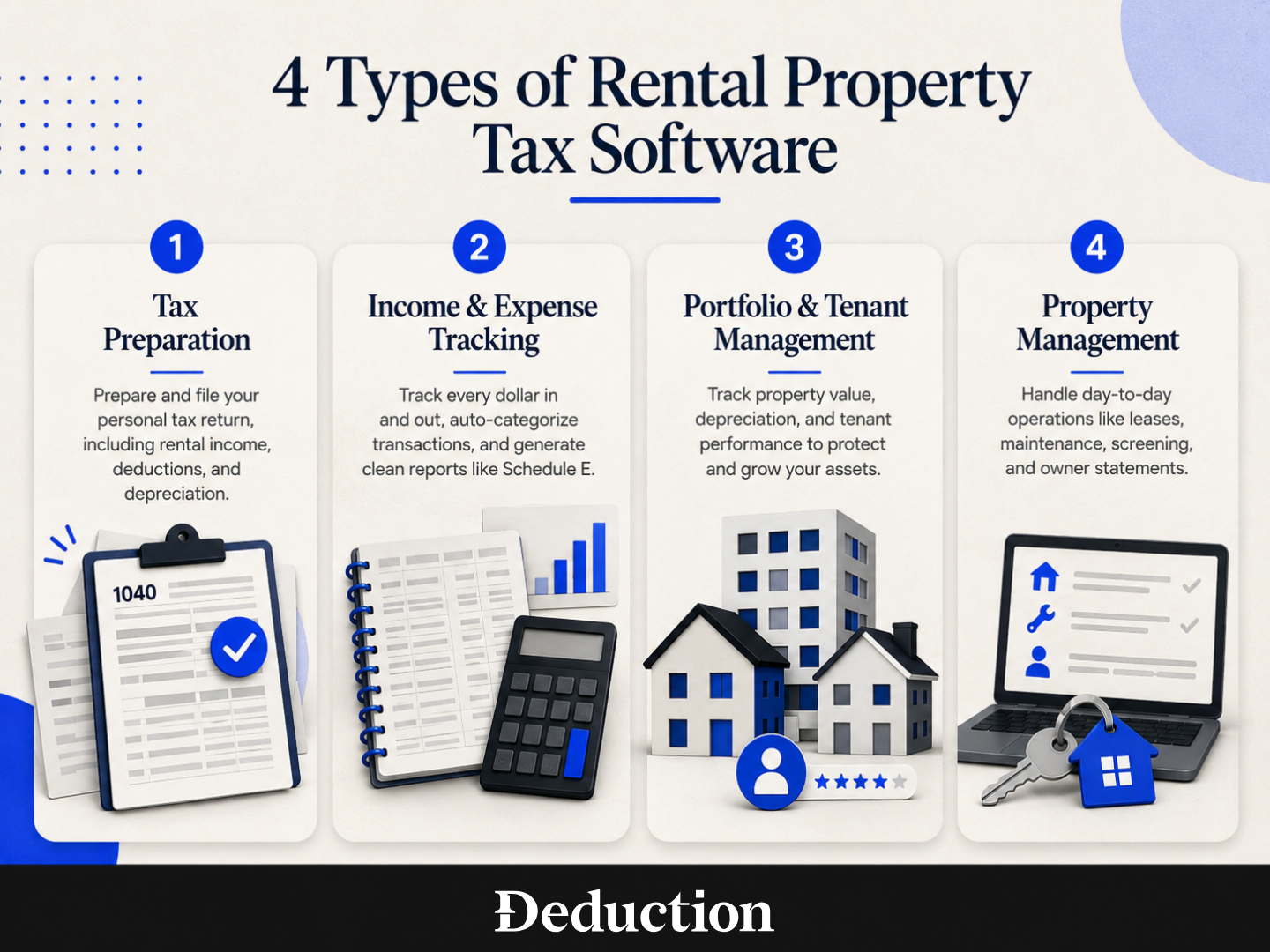
There are four types of tax software you can use to handle your rental properties’ taxes and finances. Some are all-in-one tools built for rental property and management, and some reach beyond that into your personal taxes.
Tax Preparation
Tax preparation software takes your documents and produces a filed return. For a landlord that means rental income reported on Schedule E, depreciation worked out, deductible expenses claimed, and the whole thing submitted along with the rest of your personal return.
This is the only one of the four categories that ends with your taxes filed. The other three end with a report.
Income and Expense Tracking
Income and expense tracking follows every dollar in and out and sorts it as it goes, usually by pulling transactions straight from your bank and card accounts rather than waiting for you to enter them.
The output is a clean set of books: an income statement, a transaction ledger, receipts attached to the transactions they belong to, and often a Schedule E report with the totals already grouped the way the form wants them.
That saves your preparer time, and if you pay by the hour, it saves you money. It can’t file taxes for you, though.
Portfolio and Tenant Management
These tools look at your rentals as assets rather than as a stream of transactions. They track what a property is worth, how much depreciation has built up against it, and how a tenant has behaved: whether rent arrived on time, how often something needed fixing, whether a lease is worth renewing.
The tax value is indirect but real. A depreciation schedule that has been kept up all along is worth a great deal in April, because rebuilding one from closing documents several years later is slow and easy to get wrong.
Property Management
Property management software runs the day-to-day of several units, long-term or short-term: maintenance requests, listings, viewings, screening, lease signing, and all the messages that go with them.
Third-party managers who look after other people’s buildings use the same platforms. That’s why the accounting inside them is built around owner statements rather than around your Schedule E.
If you own two rentals and manage them yourself, this category is almost certainly more than you need and more than you want to pay for.
How Does Tax Software for Rental Property Work
The mechanisms differ by category, but most of these tools work through some version of the same three steps:
- It collects the money movement: Connected bank and card accounts feed transactions in automatically, so the raw data arrives without you typing it in.
- It reads your situation: The tool holds the details that change the answer, including how the property is held, which state it sits in, whether you actively manage it, and how many days you used it yourself.
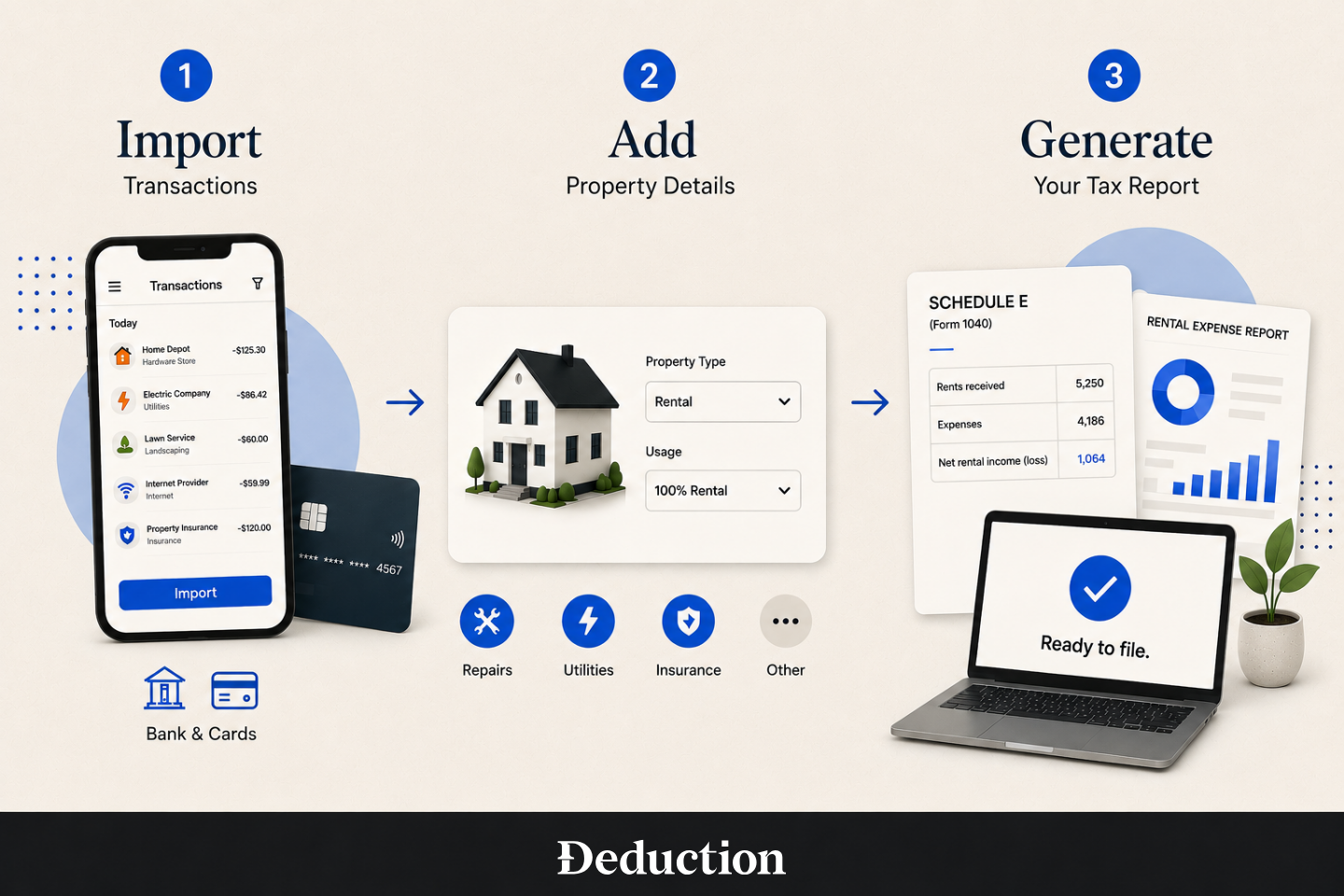
- It prepares the return, or the paperwork behind it: At the end of the year it either produces a Schedule E report for whoever files for you, or, if it’s a filing service, prepares the return and submits it to the IRS.
Do You Really Need Tax Software for Rental Property?
Short answer: no. If you own one rental, the transactions are few, and you have the time and the patience to keep records yourself, a spreadsheet and Publication 527, the IRS guide to residential rental property, will get you to a correct Schedule E.
The case for software gets stronger with every complication. A second property, a refinance partway through the year, a state you don’t live in, or a year that ended in a loss all add work that’s easy to get wrong by hand.
Is There Software That Files the Schedule E and Finds Deductions?
Yes. Deduction does both. You upload the documents that support your rental year, from mortgage interest statements to receipts for the work you paid for, and its AI accountant reads them, works out the depreciation, finds the deductions you qualify for, and prepares the Schedule E as part of your full return.
A licensed CPA reviews it before anything is filed, which is the part that matters. AI is good at reading documents and applying rules. It’s not what you want signing off unsupervised on whether a $12,000 renovation was a repair.
Most of the other tools in this article stop one step earlier. They will hand you a clean Schedule E report, which is useful, but somebody still has to put it on a return and send it.
Let Deduction Be the Tax Software for Your Rental Property and Personal Income
You can have every receipt scanned, every transaction tagged, and a clean Schedule E report sitting in a folder, and still not know whether the new roof was a repair or an improvement. Bookkeeping gets you organized, and organized isn’t the same as answered.
That is the gap Deduction fills:
- Upload your documents. Mortgage interest statements, closing documents, receipts, rent records, and anything else from the year go into your vault.
- The AI finds your deductions. Taylor reads what you uploaded, works out the depreciation, and puts your rental income and expenses on Schedule E alongside the rest of your return.
- A real CPA reviews and files. A licensed CPA checks the return before it goes to the IRS, and you can ask questions all year rather than only in April.
It’s $499 a year for a personal return, covering federal and state filing plus advice all year. This AI Tax Deduction Finder free to use until you’re ready to file, so you can ask about your rental before you pay anything.
This article is general information, not tax advice. Rental tax rules turn on details specific to your situation, so check with a CPA before acting on anything here. Software pricing and features also change often, and every price in this article was checked on August 2026, so confirm current pricing with the vendor before you buy.
Frequently Asked Questions about the Best Tax Software for Rental Property
Here are some frequently asked questions aout the best tax software for rental property:
What Is the Best Software for Rental Property Management?
It depends on scale. With a handful of units, you want per-unit income and expense tracking, rent collection, and a Schedule E report. Most of that is free. Managing other people’s buildings is a different purchase: leasing, maintenance, and owner portals, which means quoted software with a unit minimum.
What Is the Best Free Software for Landlords?
The strongest free tiers cover rent collection, tenant communication, and basic expense logging, and several aren’t capped by property count. What they hold back is automation. Bank feeds, unlimited receipt scanning, and the Schedule E report itself are the usual paid upgrades, so free generally means entering transactions by hand.
What Is the Best Free Accounting Software for Rental Properties?
For accounting specifically, look for three things in a free tier: categories that map to Schedule E lines, reporting per property rather than just per portfolio, and somewhere to store receipts against each transaction. Free plans do exist that give you all three. Almost none include a bank connection.
What Is the Best Accounting System for Landlords?
Look for double-entry accounting, reporting per property, mortgage payments split into principal, interest, and escrow, and accumulated depreciation carried forward year to year. That last one matters most. Depreciation is the number landlords lose track of, and it runs for 27.5 years on a residential rental.
What Is the Most Tax-Efficient Way to Own Rental Property?
There’s no single answer. Rental income generally escapes self-employment tax, though that flips on property you hold for sale or where you provide hotel-style services. Rental activity can also qualify for the 20% qualified business income deduction. Entity choice and cost segregation are CPA conversations, and Deduction includes that advice in its annual fee.