
Every year the gray folder sits unopened until March: a W-2, three 1099s, a brokerage summary, and receipts you meant to sort in June. AI tax software is sold as the fix for exactly this.
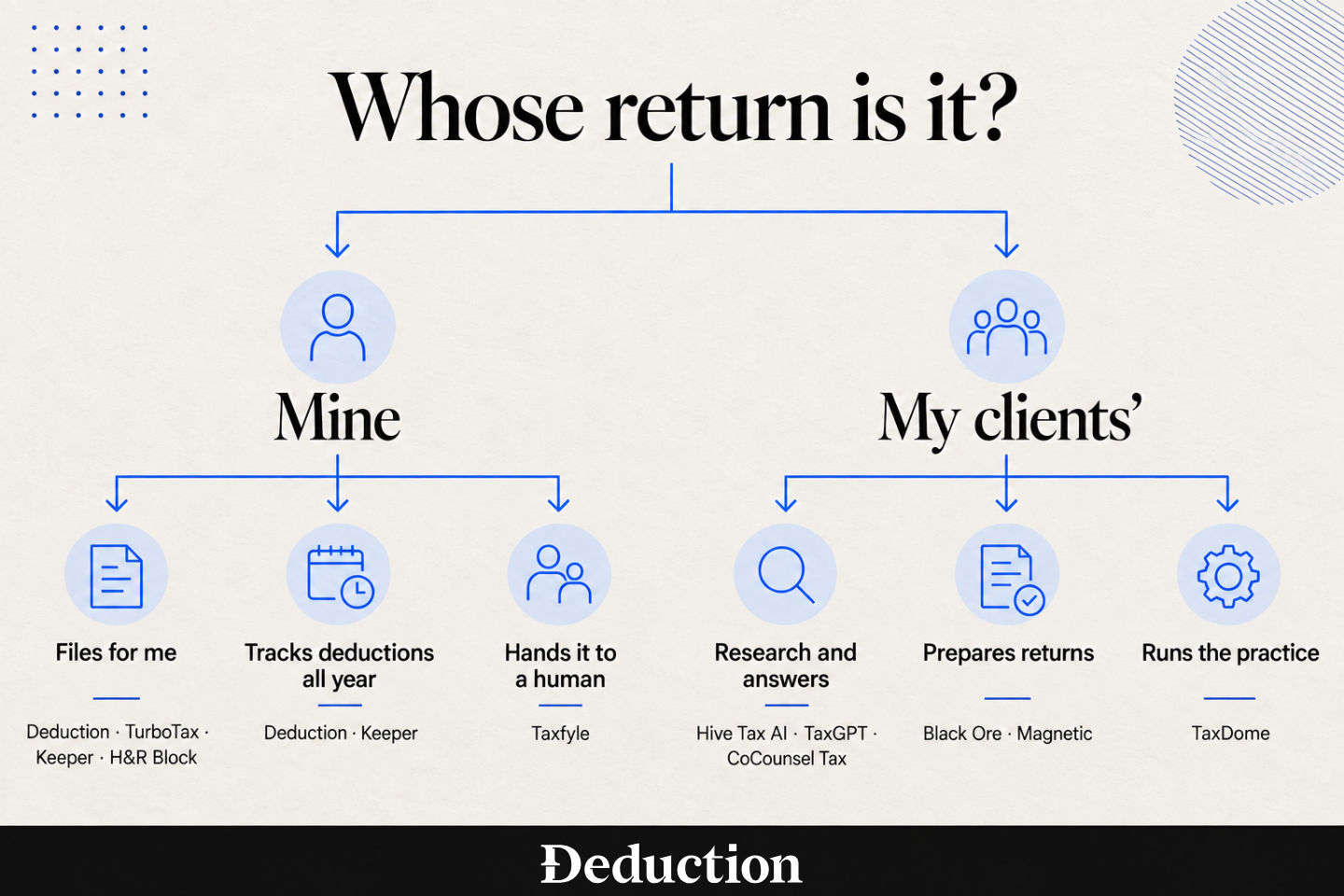
These tools do very different jobs. Some walk you through filing and bring in a remote tax professional when you need help. Others file the return but only catch the deductions you know to enter. Several are not built for individual filers at all; they are sold exclusively to CPA firms.
This guide compares 11 of the best AI tax software tools for individual taxpayers and tax firms. You’ll see what each one does, how much it costs, and when it is the wrong fit. Every price comes directly from the vendor’s website.
AI Tax Software Compared at a Glance
The first five are for people filing their own returns. The rest are firm software, sold per seat to accountants. Prices are the entry point for each product, not the total you’ll pay.
Deduction
Best for: W-2 employees, self-employed people, and investors who want deductions tracked all year and a licensed CPA to sign the return.
Deduction is an AI tax filing service built around Taylor, an assistant you can ask anything about your taxes, backed by licensed human CPAs. It covers W-2 income, 1099 and self-employment income, Schedule C, rental property, K-1s, stock options and crypto, and multi-state returns.
Throughout the year, it tracks deductions as they happen and stores documents in an encrypted vault. At filing time, the AI assembles the return, and a CPA checks every number before filing.
Pros
- Free until you file: Asking Taylor unlimited questions, uploading documents, and getting advice costs nothing all year. You pay when you file, or when you want a licensed CPA to weigh in on a high-impact decision.
- A CPA signs off: A licensed tax professional checks every number, form, and recommendation before filing, and if an error is theirs, they cover the resulting interest and penalties.
- Federal and state in one price: Multi-state situations are covered instead of billed as add-ons. Most consumer filing tools charge per state.
- Tracking runs all year: The deduction finder works on what it sees in your accounts across the year instead of asking you to remember in April.
Cons
- Steep single payment: Several hundred dollars in one payment is a lot to hand over at once, though you can ask questions for free and only pay when you’re ready to file, and the fee then covers your tax work for that year.
- Limited entity coverage: Multi-employee S Corps and C Corps are not supported. A solo owner filing one S-Corp or a small partnership LLC is inside the business tier, and a side-hustle LLC is covered by the personal plan.
Pricing
Deduction is $499 a year for personal returns, covering unlimited questions, year-round planning, and CPA-reviewed federal and state filing. A simple S-Corp or small partnership LLC is $999, and the product is free to use until you file or ask a tax professional to review a high-impact decision.
TurboTax
Best for: Filers who want the widest coverage of unusual tax situations inside one guided flow.
TurboTax is Intuit’s consumer tax software, an interview-style flow that walks you through your return question by question. It imports W-2s and 1099s directly from many employers and financial institutions.
Intuit Assist is the AI layer inside it, running accuracy checks, scanning for deductions, and answering questions about your return. The expert tiers put a human tax professional on call or hand the return over entirely.
Pros
- Wide situation coverage: Rental property, stock sales, crypto, K-1s, and multi-state returns are all handled somewhere in the tier ladder.
- Strong document import: W-2s and 1099s pull in directly from many employers and brokerages instead of being typed in by hand.
- Human help on demand: Expert Assist keeps a tax professional available while you work, and Full Service hands the return over entirely.
- No-cost simple tier: A simple Form 1040 files federal and state at no charge. TurboTax says that covers about 37% of filers.
Cons
- Narrow free tier: A situation that felt simple can push you into a paid tier partway through, and TurboTax says only about 37% of filers fit the free edition.
- Persistent upsells: Some users describe higher tiers and paid add-ons appearing pre-selected. Staying on the tier you picked takes attention.
- State price is not posted: Every paid tier is federal only, and the state fee sits behind a pop-up rather than in the price you see.
Pricing
The do-it-yourself tiers are posted at $0 for a simple return, $79 for Deluxe, and $139 for Premium, with expert-assisted tiers from $59 to $209, all federal only and all carrying a filing-by date that has already passed for the 2025 tax year. State filing costs extra, and the amount is not published on the pricing pages.
Keeper
Best for: Freelancers and gig workers with a mix of W-2 and 1099 income who lose track of write-offs during the year.
Keeper is an expense tracker and filing service for self-employed people. It links to your bank and card accounts and categorizes transactions into deductible business expenses as they happen.
At filing time, it carries those expenses into a return, asks guided questions to cover the rest, and routes the finished return to a tax pro who reviews and signs it.
Pros
- Tracking through the year: Linked accounts get categorized as you spend. The write-offs are already there when you file.
- Handles mixed income: Guided questions keep a return with both a regular job and gig work on track without you knowing which form is which.
- State filing included: Federal and up to two state returns are included in the annual price rather than billed per state.
- A tax pro signs it: Keeper has a tax professional review and sign the return before it is filed, rather than leaving you to self-sign.
Cons
- Not a bookkeeping system: Profit and loss statements and balance sheets sit outside the individual filing plans, and some users describe income categorization that is not reliable enough to run a business on.
- You may discover filing limits too late: A handful of users report uploading a year’s worth of records before learning that Keeper couldn’t handle their tax situation, leaving them to start again with another service.
- Billing and account support lag: Some users describe trial and charge timing catching them out, and email support on account problems going unanswered.
Pricing
Filing and deduction tracking together is $199 a year, including federal e-file and up to two state returns. A $399 Premium plan adds rental property, K-1s, quarterly payments, and additional states, and a $20 monthly plan tracks deductions but does not include filing.
Taxfyle
Best for: People who would rather hand the whole return to a licensed professional than answer software questions themselves.
Taxfyle connects individuals and small businesses with licensed CPAs and enrolled agents. You upload your documents, complete a questionnaire, and a credentialed professional handles the return through filing.
Behind the scenes, AI extracts and organizes information from your W-2s, 1099s, and receipts to create a first draft. The professional then checks the figures, makes any necessary corrections, and files the completed return.
Pros
- A licensed pro does the work: A CPA or enrolled agent prepares and files the return. You aren’t the one deciding what goes where.
- You can request your previous pro: If they are still active on the platform and accept the job, it routes back to them instead of to a stranger.
- No tax knowledge needed: Uploading documents and answering questions is the whole job on your side.
- One question without a full engagement: A 30-minute advisory call starts at $50, so you can get something answered without commissioning a whole return.
Cons
- No guaranteed turnaround: Taxfyle does not publish a firm completion timeline, and some users report waiting days for a matched preparer to respond.
- You won’t see the full price upfront: Taxfyle only publishes its service fee and advisory rate. Your preparation fee depends on the job, and any additional forms can raise the final cost.
- Last-minute filing can be risky: Some users report signing up close to the tax deadline, only to receive a refund and be told to find another accountant.
Pricing
Taxfyle publishes a $9.99 service fee per tax return request and advisory calls starting at $50 per 30 minutes, but not the preparation fee itself. That fee is quoted per job based on your situation, and additional forms are billed on top of the base price.
H&R Block
Best for: Filers who want the option of walking into an office if the online return goes sideways.
H&R Block sells consumer tax preparation three ways: online software you drive yourself, virtual help from a tax professional, and in-person appointments at its offices. The online product is a guided flow with a tier ladder.
Paid online plans include AI Tax Assist for around-the-clock questions. If you choose Tax Pro Review, a human tax professional checks your documents, signs the return, and files it electronically.
Pros
- Offices you can walk into: Thousands of physical locations mean a return that goes wrong has somewhere to go that isn’t a support queue.
- Broad free tier: Free Online covers a Form 1040 plus a few schedules and includes state filing at no charge. H&R Block says that fits about 52% of filers.
- Human help bundled in: The paid do-it-yourself tiers include access to a live tax professional at no additional charge.
- State pricing is posted: State filing is $49 per state, and the number is published rather than hidden behind a pop-up.
Cons
- Weaker state side: The federal flow holds up better than the state one on complicated returns, and some users describe state errors that only surfaced after filing.
- Guarantees are slow to collect: Some users describe repeated escalation across offices and months of waiting before an accuracy guarantee was honored.
- Quoted price can drift: Posted prices are flat, but some users describe a self-employed return costing well above the figure quoted at the start.
Pricing
Free Online is $0 for federal and state, and the paid tiers are $65 for Deluxe, $105 for Premium, and $130 for Self-Employed, plus $49 per state filed. Bundling Tax Pro Review takes Deluxe to $130, Premium to $200, and Self-Employed to $225, plus the same $49 per state.
Hive Tax AI
Best for: Solo practitioners and small firms who need cited tax research and client-ready planning reports.
Hive Tax AI helps tax professionals, financial advisors, and small CPA firms research tax questions and build plans for clients. You can ask a question in plain language and receive an answer with inline citations to IRS guidance, tax court decisions, and state sources.
Its separate planning tool scans a client’s return for potential strategies, estimates the possible savings, and turns the findings into a client-ready report with clear implementation steps.
Pros
- Citations on every answer: Research responses come back with inline references to the underlying IRS material and court cases.
- Published solo price: A sole practitioner sees a real number before talking to sales, which most firm software here will not show you. Multi-user firm pricing is still quoted.
- Routed by difficulty: Simple questions go to a fast model and complex ones to a higher-reasoning model. You don’t trade speed against depth across the whole tool.
- Planning as well as research: The planning product turns a scanned return into a client-facing report rather than leaving you to write one.
Cons
- Does not file taxes: Its own terms state the service is informational and does not constitute tax preparation. Returns are prepared and filed elsewhere.
- Metered by plan count: The planning product is sold in blocks of plans. A busy season pushes a growing firm into the next tier mid-year.
- Professionals only: There’s no consumer product here. The tiers assume you are serving clients rather than filing your own return.
Pricing
The research assistant is $79 a month or $799 a year for a sole practitioner, with a five-day free trial and no card required. The planning product is sold by volume at $699, $1,199 or $3,299 a year, and firm pricing is quoted.
TaxGPT
Best for: Accounting firms that want research, review, and preparation agents working inside the software they already run.
TaxGPT adds AI tools to the tax software your firm already uses. It researches tax questions with supporting citations, drafts memos and responses to tax notices, and maintains a record for each client entity so you do not have to rebuild the context with every request.
Its preparation agents enter data directly into your firm’s tax software. Once the return is complete, a separate review agent checks it for issues before a professional signs off.
Pros
- Cited research: Answers arrive with citations to federal, state, local, and treaty sources rather than as unsourced summaries.
- Handles document volume: Bulk upload and document management are built in, and some users describe categorizing thousands of client documents in hours rather than days.
- Works inside your tax engine: Agents operate in the software the firm already licenses instead of asking it to migrate.
- Onboarding scales with the tier: Self-guided onboarding at the entry plan becomes white-glove one tier up, and in-person at the firm level.
Cons
- Expertise required: The firm product assumes enough tax knowledge to ask the right question and judge the answer, and some users describe needing time to learn how to prompt it well.
- Does not file taxes: It produces reviewer-ready returns inside the firm’s software. The firm still files and signs them.
- No published pricing: Every plan routes to a demo booking. Comparing cost against another tool means sitting through a sales call first.
Pricing
TaxGPT publishes no prices, and all three plans route to a demo. The vendor says pricing depends on team size, client count and which capabilities you need, so expect a per-seat annual subscription quoted per firm.
Black Ore
Best for: CPA firms automating 1040, 1065 and K-1 preparation at volume.
Black Ore is an AI tax preparation platform for accounting firms. It ingests source documents, extracts and classifies the data, applies tax logic, and produces a prepared return that lands in the firm’s existing tax software.
Black Ore delivers a prepared return with supporting workpapers for your firm to review, sign, and file. You can purchase the automation separately for each return type, depending on where your firm needs it most.
Pros
- Review-ready output: Returns arrive prepared with workpapers attached and drop into the software the firm already uses.
- Buy one return type at a time: 1040, 1065, and K-1 automation are sold as separate lines. A firm can start where the volume hurts most.
- Large-firm references: Black Ore names Baker Tilly, Grassi, and Withum as customers. Most firm software in this space names nobody.
- Built for volume: The product is designed around one problem, which is getting through peak season without seasonal hiring.
Cons
- No published pricing: Every tier says request pricing. You can’t find out what a pilot costs without a sales conversation.
- Does not file taxes: It prepares and hands off. The firm reviews, signs, and files.
- References all skew large: The named customers are large national firms, so a small practice has little comparable evidence to judge fit by.
Pricing
Black Ore publishes no prices, and its 1040, 1065, and K-1 lines all say request pricing. Expect a quote scoped to return volume and return type, negotiated with sales.
CoCounsel Tax
Best for: Research-heavy firms already working inside the Thomson Reuters ecosystem.
CoCounsel Tax is Thomson Reuters’ AI assistant for tax professionals. It answers research questions using Checkpoint content, the Internal Revenue Code, and government sources, with citations you can check for yourself.
You can also upload returns, K-1s, and other client documents, ask questions about their contents, and draft memos from the findings. CoCounsel handles the research and analysis, while separate compliance software is still needed to prepare and file the return.
Pros
- Grounded in Checkpoint: Answers are built on Thomson Reuters research content and government sources rather than on open web text.
- One workspace: Research, client document review, and memo drafting sit in the same place instead of across three tools.
- Published entry price: Tax Essentials carries a posted per-user annual price. Most firm AI software quotes instead.
- Document interrogation: You can upload a return or a stack of K-1s and ask questions directly against them.
Cons
- Weekly response cap: The entry tier includes 20 Checkpoint-backed responses a week. A research-heavy month pushes you up a tier.
- Research library sold separately: Tax Essentials grounds answers in Checkpoint but doesn’t include access to the Checkpoint Edge library itself.
- Does not file taxes: This product is research and analysis. Thomson Reuters sells return preparation and e-filing in separate software.
Pricing
CoCounsel Tax Essentials is $1,300 per user per year on a one-year plan, and online purchase is available only for firms up to ten users. A per-user Tax Research add-on unlocks deeper research, and no audit and accounting version exists yet.
TaxDome
Best for: Firms that want client communication, documents, billing, and workflow living on one client record.
TaxDome is practice management software for tax, bookkeeping and accounting firms. It holds the CRM, document management, e-signatures, organizers, secure messaging, time tracking, proposals, invoicing, and a white-labeled client portal in one place.
TaxDome automates your firm’s workflow and client communication rather than calculating taxes. It connects with the tax programs you already use, where the return is prepared and electronically filed.
Pros
- One client record: Documents, tasks, invoices, and messages all attach to the same profile. Nothing lives in a separate inbox.
- Clients will use the portal: The portal and mobile app are approachable enough that clients stop sending documents as email attachments.
- Strong implementation support: Firms switching from another system describe rollout help that goes beyond a setup guide.
- Published per-seat pricing: Plans and multi-year rates are posted openly. A firm can budget before contacting anyone.
Cons
- Rigid reporting: Getting a work-in-progress report to show what you want on one page is difficult, and long-term customers describe invoice output they were not comfortable sending to clients.
- Complex pipelines: Workflow setup takes real configuration time, and a badly built pipeline creates more friction than it removes.
- Does not file taxes: It wraps around your tax software rather than preparing returns. You still license a preparation program separately.
Pricing
TaxDome runs $800 a year per user for solo Essentials, $1,000 for Pro and $1,200 for Business, with lower rates on two- and three-year commitments. All plans are billed upfront, with installment plans above $9,000, and firms of 25 or more seats can request a custom quote.
Magnetic
Best for: Firms that want 1040 preparation done for them and delivered ready for final sign-off.
Magnetic is a done-for-you 1040 preparation service for CPA and tax firms rather than software the firm operates. Its AI reads client documents, including handwritten notes and phone photos, and reasons across the whole return at once.
It then enters the data into the firm’s existing tax software, and US-based enrolled agents and CPAs review every return before delivery. Each one arrives with workpapers and flags for unresolved items.
Pros
- Reasons across the whole return: It checks prior-year basis, K-1s, and related schedules together instead of pulling fields one at a time.
- Nothing to install: Data is entered into the firm’s existing tax engine directly, with no API work or migration.
- A licensed reviewer first: A US-based CPA or enrolled agent reviews every return before it reaches the firm.
- Accuracy guarantee: A misentry or omission that moves the client’s liability by more than $10 credits the preparation fee for that return, reported within 60 days.
Cons
- Vendor-reported results: The time-saving and accuracy figures come from Magnetic’s own marketing rather than from independent testing.
- Does not file taxes: Magnetic does not sign returns. The firm keeps legal responsibility for verifying every output before submission.
- No published pricing: There’s no pricing page at all, and cost only emerges from a demo.
Pricing
Magnetic publishes no pricing page and offers a demo booking or a self-serve sign-up instead of a price. Its accuracy guarantee refers to the preparation fee charged for a given return, so expect per-return pricing quoted after that call.
What Is AI Tax Software?
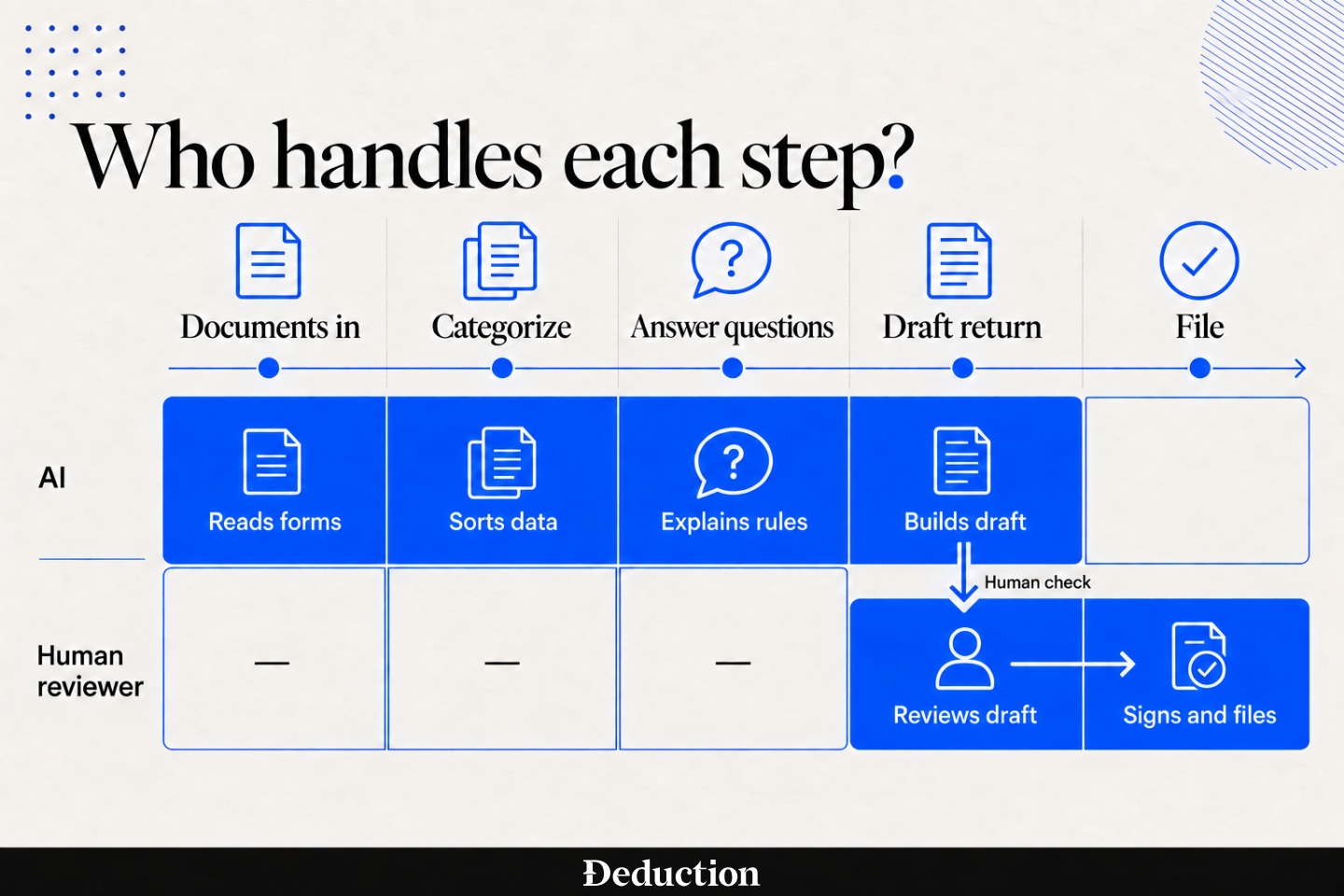
AI tax software is any tool that uses machine learning to do part of the tax work a person used to do by hand: reading documents, categorizing expenses, answering questions about the rules, drafting a return, or checking a finished one for errors.
“AI tax software” can describe tools that do entirely different jobs. Before choosing one, check exactly which parts of the tax process it handles and which tasks are still left to you or a tax professional.
Main Types of Tax Software
Which group a tool belongs to decides whether you can even buy it. There are three:
- Built for individuals: These prepare and file your personal return. The better ones track deductions during the year so the write-offs are already recorded by the deadline.
- Built for businesses: These handle entity returns, payroll, and multi-owner situations, and they generally assume someone in the business is already keeping books.
- Built for accountants: These sit inside a firm’s existing tax engine and speed up research, document intake, and return review. Most are sold per seat and assume you have clients.
Benefits of Using AI Tax Software
AI tax software earns its keep by handling the repetitive tax work that is easy to postpone, overlook, or get wrong. So here are the benefits of using it:
- Faster filing: Documents get read and fields populated automatically. Most of the manual data entry disappears from the job.
- Errors caught early: The software flags missing forms and mismatched figures before you file, giving you time to correct them before they cause a rejection or an IRS notice.
- Deductions surfaced for you: The software scans flags potential write-offs in your transactions as they happen, so you do not have to reconstruct a year of deductible expenses from memory.
- Filing handled end to end: The tools that file will transmit federal and state returns and tell you when each one is accepted.
- Tax rules kept current: Updated rates, thresholds, and filing rules are built into the software, so you are less likely to apply a figure that expired last year.
- Less work at filing time: Linked accounts and a document vault collect your transactions and tax records throughout the year, sparing you from sorting through everything in one frantic weekend.
How to Choose an AI Tax Software for You
Work through these in order. Most bad software decisions come from skipping the first one:
- Identify your need: Decide whether you’re filing a personal return, running a business, or preparing returns for clients. These are three different markets, and most tools serve only one.
- Check the niche the tool fills: A research assistant, a deduction tracker, and a filing service aren’t substitutes for each other, even when all three are marketed as AI tax software.
- Check the price against long-term value: A per-seat annual subscription and a once-a-year filing fee are hard to compare directly. Work out what a full year costs you, including state returns and add-ons.
- Test it against your real situation: Run your own documents through a trial, not a sample return. Products handle rental property, K-1s, and multi-state very differently.
- Test for accuracy, and prefer one tool over several: Check the answers it gives against a source. A single tool covering your whole process usually beats stitching together three that each cover a third of it.
- Set it up early: Start before the end of the year so the software can track your activity as it happens. Waiting until tax season leaves you with the same missing receipts and forgotten expenses you were trying to avoid.
Criteria in Choosing a Tax Software For You
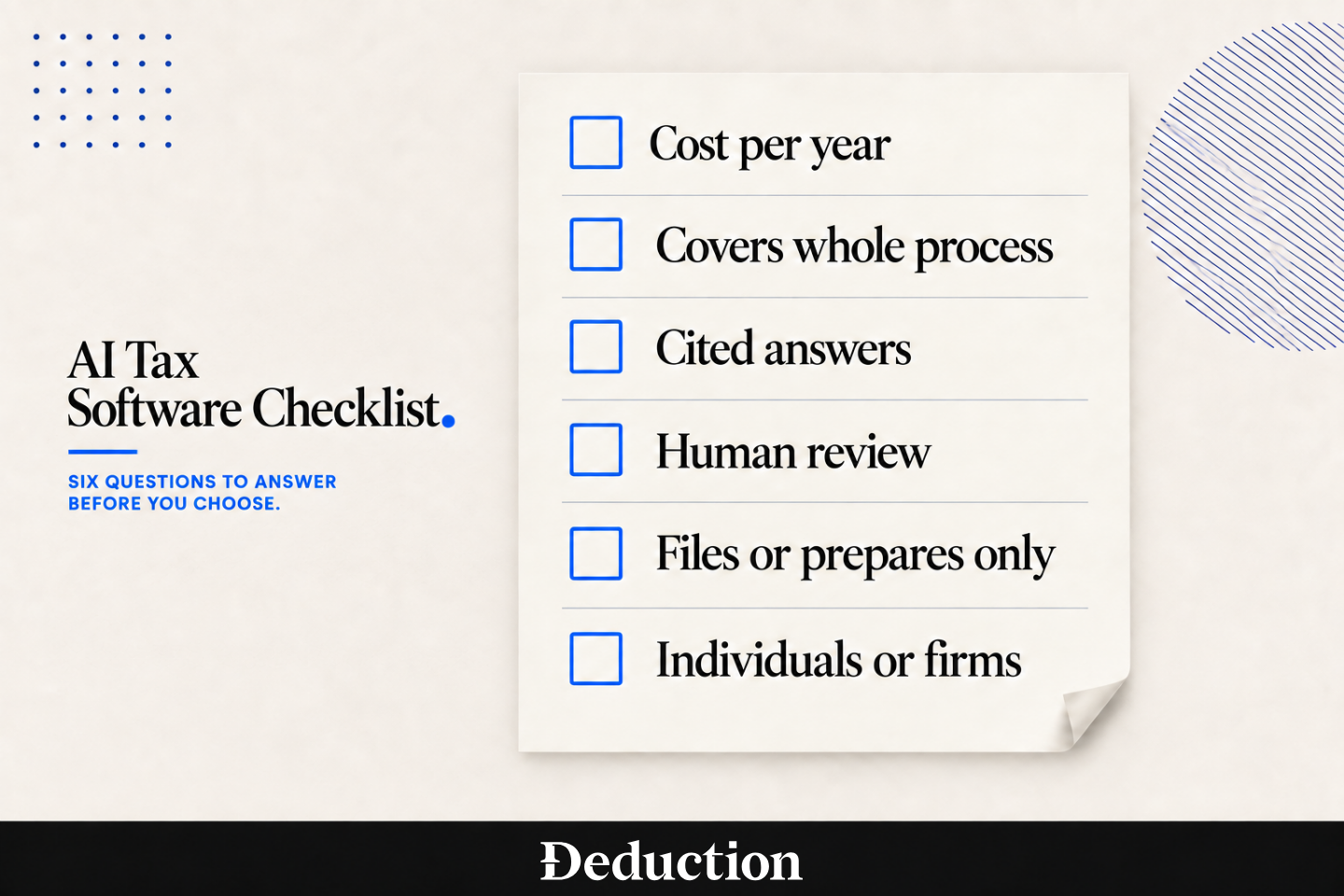
Six questions worth answering before you pay for anything:
- Is the software cost-effective for how often you’ll use it? A monthly research subscription and an annual filing fee suit very different usage patterns.
- Does it cover your entire tax process? Check whether the tool only organizes your documents or also finds deductions, prepares the return, arranges professional review, and files it
- Can you verify its answers? Look for citations that lead to the tax rule or official source behind each answer. A confident response is far less useful when you cannot check where it came from.
- Is there a human check on the AI? AI-only tax filing leaves nobody between the model and the IRS to catch a confidently wrong answer.
- Does it file your return, or stop at preparing one? Six of the eleven tools here do not file taxes at all.
- Is it built for individuals or for tax professionals? Firm software is usually priced per seat and assumes you have clients to serve.
Let Deduction Be Your AI Tax Software for Tax Prep and Finding Deductions
You can scan every receipt, categorize every transaction, and keep a perfectly organized expense report, yet still have questions that organization alone cannot answer. Does your workspace qualify for the home office deduction? Can you deduct that equipment in full this year, or must you spread the cost over five or seven years?
Those decisions can change how much tax you owe. Deduction helps you resolve them, applies the answers to your return, and takes the filing process through submission.
- Upload your documents: W-2s, 1099s, brokerage summaries and receipts go into an encrypted vault, and you can add them as they arrive rather than all at once.
- The AI finds your deductions and credits: Taylor reads what you uploaded, tracks deductible spending through the year, and asks about the situations that change the answer.
- A real CPA reviews and files: A licensed human CPA checks every number and every form before your federal and state returns are submitted.
You can ask Taylor tax questions for free throughout the year. You pay when you are ready to file or need a licensed CPA to review a high-impact decision. Before anything reaches the IRS, a CPA checks the return and takes professional responsibility for what is filed.
This article is general information, not tax advice. Your situation may change which of these tools fits and what you can claim, so talk to a CPA about your specific facts. Pricing and features also change frequently, so confirm current pricing on the vendor’s own site before buying.
Frequently Asked Questions About AI Tax Software
Which AI Tool Is Best for Taxes?
It depends on whether you’re filing your own return or preparing returns for clients. If you’re filing your own, look for a tool that both finds deductions and files, with a licensed CPA reviewing before submission. Deduction does both. If you prepare client returns, you want firm research and preparation software instead.
Can I Use ChatGPT to Do My Taxes?
You can upload documents and ask it questions, but it cannot transmit a return to the IRS. General-purpose models also state tax rules confidently without citations, and rules change mid-year. Use ChatGPT for taxes to understand a concept, not to decide what to claim.
What Is the AI Tool for Tax Filing?
Filing tools are the ones that transmit a completed return to the IRS. Deduction files federal and state returns with a licensed CPA reviewing first. Most tools built for accounting firms stop at preparing a return and hand it back to the firm to file, so check this before subscribing.
What Is the Alternative to TaxGPT?
TaxGPT sells to firms and to individuals, but it does not file a return. It answers questions and reviews one you prepared elsewhere. If you want one service that finds deductions and then files, Deduction does both with a CPA reviewing first. If you prepare client returns, look for a research assistant that cites sources.
Should I Use AI to Do My Taxes?
Yes, with a human check. AI is reliable at reading documents, categorizing expenses and surfacing deductions you’d miss. It’s less reliable on judgment calls, like whether a cost is a repair or an improvement. Pick a service where a licensed CPA reviews the return before it is filed.
How Can ChatGPT Help Accountants?
It drafts client emails, summarizes documents and explains a concept quickly. What it will not give you is a client file: nothing structured or auditable enough to rely on for a prior-year position, and no connection to your tax engine. Purpose-built tax research tools do both and show their sources.
How Is AI Used in Taxation?
In four main ways. It reads and classifies source documents, categorizes transactions into deductible expenses, answers research questions with citations, and reviews finished returns for errors before a human signs. It’s used far less for judgment calls, which still sit with a licensed professional.
Can a CPA Be Replaced by AI?
No, though not every tool includes one. AI handles data entry, document reading and first-pass review well, but most consumer software lets you file with no licensed human involved unless you pay for review. The CPA’s value moved from entering numbers to judgment and accountability for what gets filed.
Is There a Free AI for Accounting?
Free trials, yes. Free products, rarely. Most professional research and planning tools run a trial of a few days, then charge per seat. On the consumer side, Deduction is free all year for questions, uploads and advice, and you pay when you file or want a CPA on a high-impact decision.