
TurboTax is one of the most popular tax filing services out there, as headed by the accounting tech giant Intuit. Its Free Edition covers roughly 37% of taxpayers, meaning a simple Form 1040 with only W-2 income may never cost you anything.
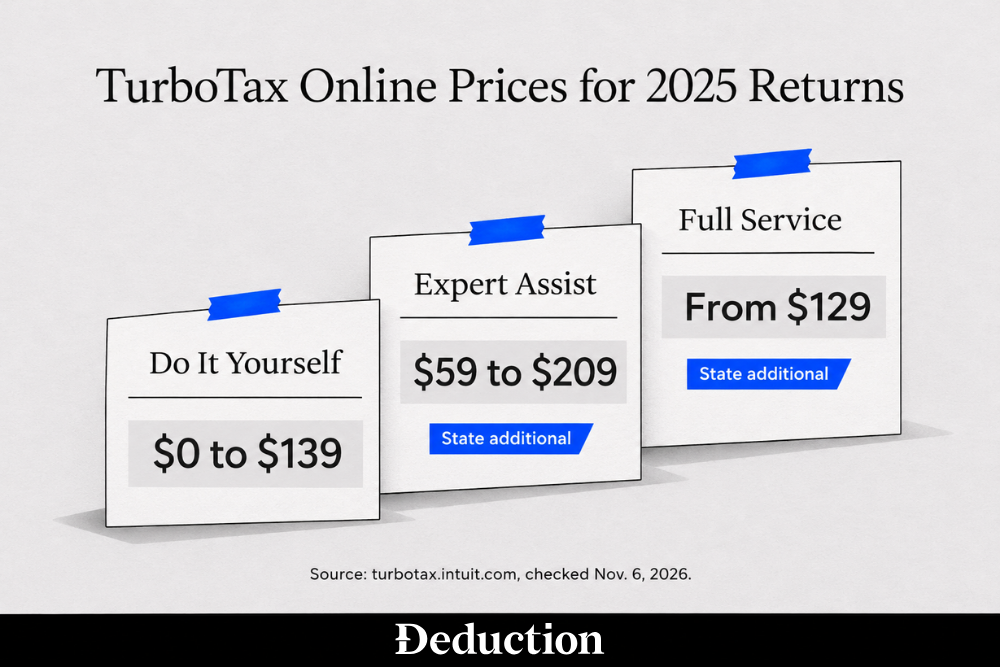
You tend to start paying more once your return needs a Schedule C, stock sales, or an expert assisting you. For 2025 returns, TurboTax's do-it-yourself tiers ran up to $139, Expert Assist up to $209, and every paid tier charged extra for state.
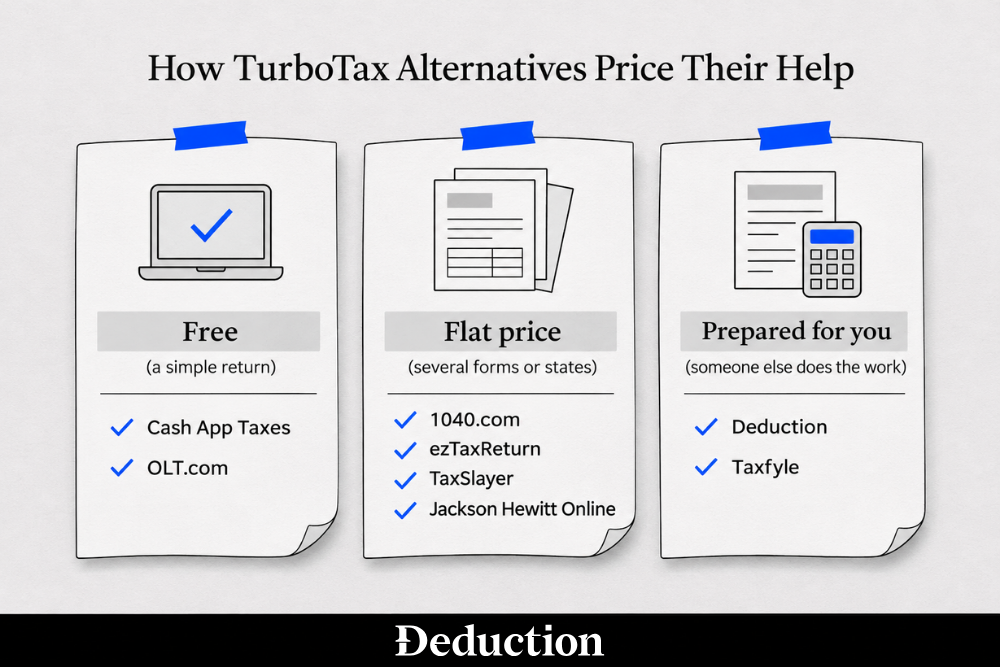
In this article, we are going to talk about the nine alternatives below costs less, charges one flat price, or prepares the return for you. The table sorts them into services that prepare your return and software you run yourself.
We checked each provider's prices on November 6, 2026. Deduction is our own product, and it gets the same pros, cons, and pricing breakdown as everyone else on the list.
Deduction
Best for: Filers who want AI to prepare their return from their documents and a licensed professional to check it before filing.
Deduction is a tax filing service built around AI. Taylor, its AI tax agent, prepares your federal and state returns from the documents you upload and asks about anything missing.
A CPA or another licensed tax professional reviews every return before it's filed. Our Deduction vs TurboTax comparison covers how that differs from working through TurboTax's interview.
Pros
- Prepared for you: Taylor builds the return from your W-2s, 1099s, and other documents. You don't answer a question-by-question interview.
- Professional review: A CPA or another licensed tax professional checks your return before it's filed.
- Year-round questions: You can ask Taylor about withholding, quarterly payments, or a new side job in any month, by email, call, or text, and get these decisions reviewed by Deduction's tax team.
- Pay when you file: Asking questions and uploading documents is free. You pay when you're ready to file.
Cons
- Costs more than DIY: At $499 a year, it costs several times what the do-it-yourself programs here charge.
- Limits on complex returns: Rental property and operating K-1s move you to the $999 Reserve plan, and returns for multi-employee S corps or C corps are priced case by case.
Pricing
Deduction costs $499 a year for federal and state filing, plus a year of questions. Returns with rental property or operating K-1s need Deduction Reserve at $999, and Deduction Business is $999 for a simple solo S corp or small partnership LLC.
Taxfyle
Best for: Filers with complex returns who want a licensed CPA or EA to prepare them.
Taxfyle is an online tax filing service that connects you with a licensed US-based CPA or enrolled agent. That person prepares and files your return.
It's built for returns with K-1s, crypto, income from several states, or self-employment. Compared to TurboTax, Taxfyle initially starts its operating process with an expert and its software, while TurboTax gives the DIY option.
Pros
- Licensed preparer: A CPA or EA prepares your return instead of reviewing one you entered yourself.
- Built for complex returns: K-1s, crypto, multi-state and self-employment income are the situations Taxfyle is set up for.
- Business returns too: It also prepares returns for LLCs, partnerships, S corps, and C corps.
- Responsive pros: 3rd party Reviews mention pros who reply quickly and keep working with the same CPA each year.
Cons
- No published price: Taxfyle quotes each return from a questionnaire and usually takes about half the cost up front.
- Uneven follow-through: Some users describe slow replies or missed deadlines from the pro they were matched with.
- Online only: Taxfyle works through its app and website, and it doesn't advertise in-person meetings with your pro.
Pricing
Taxfyle doesn't publish a price for an individual return, and you get a quote after answering its questionnaire. Separate tax advisory calls start at $50 per 30 minutes.
Compared to Taxfyle and Deduction, the rest of the filing software works the same way TurboTax does. You answer the questions, the software does the math and e-files the return, and you usually pay less, but you have to review them yourself, in the cheaper tiers..
H&R Block
Best for: Filers who want software like TurboTax's, with an H&R Block office to fall back on.
H&R Block Online is do-it-yourself tax software from the H&R Block tax chain, with Free, Deluxe, Premium, and Self-Employed tiers. Its Free Online edition covers simple returns, and H&R Block says about 52% of filers qualify.
It's the closest match to TurboTax in how it works. If your return gets harder, you can add a tax pro's review or hand it to an H&R Block office.
Pros
- Free simple returns: Free Online includes a federal and a state return at $0 for W-2 income and a few common credits.
- Lower top tier: Self-Employed costs $130 for 2025 returns, a little under TurboTax's top do-it-yourself price.
- Unlimited expert help: Deluxe, Premium, and Self-Employed include unlimited help from a tax expert while you file.
- In-person option: You can add Tax Pro Review to any online tier or move to in-office or virtual prep with an H&R Block tax pro.
Cons
- Per-state fee: Each state return costs $49 on the paid tiers.
- Narrow free tier: Free Online leaves out Schedule C, Schedule E, stock sales, and itemized deductions, so most self-employed filers start on a paid tier.
- Preparer credentials vary: H&R Block says its office preparers may not be licensed accountants, and office prices depend on your forms.
Pricing
Free Online is $0 for federal and state, and Deluxe, Premium, and Self-Employed cost $65, $105 and $130, each plus $49 per state. In-office or virtual prep with a tax pro starts at $99, plus at least $75 per state.
OLT.com
Best for: Filers with Schedule C or Schedule E income who want free federal filing and a low state fee.
OLT.com is do-it-yourself tax software from On-Line Taxes, and it's one of the IRS Free File partners. Its Free Edition has no income cap and includes Schedule C and Schedule E.
Freelance and rental income stay in the free federal return, compared to TurboTax, which moves you to a paid tier. Premium adds phone and chat support for a few dollars.
Pros
- Free federal for more forms: Self-employment, stock sales, and rental income are all included in the $0 federal return.
- Low state fee: Each state return costs $9.95, or $7.95 if you subscribed to Premium.
- Cheap support upgrade: Premium adds phone and chat support for only $7.95.
- Simple to use: A few users mention a plain layout, making it a quick filing run.
Cons
- Email-only help on Free: The Free Edition comes with email support only. Phone and chat need Premium.
- Audit help costs extra: Audit support comes only with Premium, so the Free Edition leaves you on your own if the IRS sends a letter.
- No tax pro: Neither edition offers a tax professional to answer questions or review your return.
Pricing
The Free Edition is $0 for federal with no income cap, and each state return costs $9.95. Premium costs $7.95 and lowers the state fee to $7.95 per state.
1040.com
Best for: Filers who want one flat price with Schedule C, rentals, and stock sales included.
1040.com is do-it-yourself tax software from Taxwell, the company behind Drake Software and TaxAct. Everyone pays the same flat price for a federal and state return, whatever forms they need.
Schedule C, stock and crypto sales, and rental property are all included. Unlike TurboTax's tiers, the price doesn't climb as your return gets more complicated.
Pros
- One flat price: Federal and state cost $34.99 together, and 1040.com says multiple states are covered by the same flat rate.
- More forms included: Self-employment, stock and crypto sales, and rental income are all at the same pricing bracket
- Free File partner: It's an IRS Free File partner. During filing season, starting from the IRS Free File page may get you a free federal return if you meet its income limit and rules.
- Clear interview: Many users describe the questions as easy to follow and quick to finish.
Cons
- No tax pro: No tax professional answers your questions or reviews your return. Help comes only through chat, email and a knowledge base, with no phone line.
- Add-ons cost extra: Paying from your refund costs $29.95, and Audit Assistance, a third-party audit protection service rather than a tax pro who reviews your return, costs $34.95.
- No imports from other software: Only returning 1040.com filers get last year's details carried forward.
Pricing
Every return costs $34.99 for federal and state together. Paying the fee out of your refund adds $29.95.
Cash App Taxes
Best for: Filers with a single state return who want free federal and state filing and who has Cash app on phone.
Cash App Taxes is free tax software inside Cash App. Federal and state returns cost nothing, including ones with self-employment income or stock and bitcoin sales.
It can import a PDF of last year's TurboTax return to fill in your basic details. You'll need a Cash App account, and there's no tax pro to ask.
Pros
- Free federal and state: You pay nothing for either return, and there are no paid tiers to upgrade into.
- Self-employment included: Freelance and gig income are covered without an upgrade.
- Investments included: Returns with stock or bitcoin sales are free too.
- TurboTax import: You can upload last year's TurboTax PDF to pre-fill your household and filing status details.
Cons
- One state only: It doesn't support multiple-state, part-year or nonresident state returns.
- No tax pro help: Phone support covers the app, and no tax professional answers questions about your return.
- Cash App account required: You'll need Cash App on your phone and a verified account before you can start your return.
Pricing
Federal and state returns are free, including returns with self-employment income. If your return isn't supported, such as one with income in two states, you'll need to file somewhere else.
ezTaxReturn
Best for: Filers with simple, low-income returns who want free federal filing and US-based support.
ezTaxReturn is do-it-yourself tax software and one of the IRS Free File partners. Its federal return is free only for very simple returns, with conditions such as no dependents, income only from wages, tips, unemployment, and a little interest, and total income under $16,000.
Everyone else pays a flat price for federal and another for state. Paid returns come with seven days of free US-based support by callback or email.
Pros
- Free simple federal: If your return meets its conditions, the federal return costs nothing.
- Flat paid price: If you don't qualify, federal is $44.99 whatever forms you need.
- US-based support: Paid returns include seven days of support from a US-based team by callback or email.
- Free File partner: It's an IRS Free File partner. During filing season, starting from the IRS Free File page may get you a free federal return if you qualify.
Cons
- State costs more than federal: A state return is $45.99, a dollar more than federal.
- Narrow free tier: The free return is limited to single or joint filers with no dependents, wage or unemployment income, under $1,500 of interest and total income under $16,000.
- No tax pro: No tax professional reviews your return, only an automated error check, and support is limited to a seven-day window.
Pricing
A federal return is $44.99 unless it qualifies as simple, and a state return is $45.99. Audit defense and amended return insurance cost extra.
TaxSlayer
Best for: Confident filers who want Schedules C and E on a low-priced tier.
TaxSlayer is do-it-yourself software with several tiers, and it's an IRS Free File partner. Its Classic tier covers the main schedules, including C and E, so self-employment and rental income don't force an upgrade.
It can import a PDF of last year's Form 1040 from many other programs. Chat support and Ask a TaxPro are only on its higher tiers.
Pros
- Low price for Schedules C and E: Classic covers self-employment and rental income at its entry price.
- Free for active-duty military: If you're on active duty, the federal return on Classic is free, with state returns extra.
- Prior-year PDF import: You can upload last year's Form 1040 PDF when you start, and your basic details carry over.
- Uncapped accuracy guarantee: TaxSlayer reimburses federal or state penalties and interest caused by a calculation error, with no dollar cap listed.
Cons
- Per-state fee: Each state return costs $47.99 on the paid tiers.
- Tax pro on higher tiers only: Chat support and Ask a TaxPro come only with the Premium and Self-Employed tiers.
- Upgrade fees: Adding certain forms moves you up a tier automatically, and paying from your refund adds a processing fee.
Pricing
Classic cost $44.99 for federal plus $47.99 per state for 2025 returns. TaxSlayer says prices may change during the filing season, so check the price when you start.
Jackson Hewitt Online
Best for: Filers who want the lowest flat online fee, with every state return included.
Jackson Hewitt Online is the do-it-yourself product from the Jackson Hewitt tax chain. Its tax prep fees top out at $25 total, and every state return is included.
Its supported forms include Schedules C, D and E and K-1s. If you'd rather have a person do it, Jackson Hewitt also runs offices, many of them inside Walmart stores.
Pros
- One flat fee: Tax prep fees are capped at $25, with no charge for state returns.
- Wide form coverage: Self-employment, stock sales, rentals and K-1s are on its supported forms list.
- Free live chat: Online filers get free chat support during tax season.
- Offices as a backup: If your return gets more complicated, you can move to an in-person Jackson Hewitt preparer even at a Walmart.
Cons
- No tax advice online: The online product doesn't give tax advice, so a tax pro means paying for its separate Tax Pro From Home service or visiting an office.
- Limited imports: Its online page mentions uploading a W-2 but doesn't list importing last year's return from another provider.
- Paid add-ons: The $25 cap doesn't cover add-ons such as paying your fee from your refund (eCollect) and Protection Plus.
Pricing
Tax prep fees are capped at $25 total, with $0 for state returns. Add-on services cost extra, and their prices aren't listed on that page.
How to Choose a TurboTax Alternative
The right pick usually depends on which part of the TurboTax bill you want to avoid. For 2025 returns, TurboTax's do-it-yourself tiers ran from $0 to $139, Expert Assist from $59 to $209, and Full Service from $129, with state returns extra on paid tiers.
Here's how the common situations line up:
- A simple return: If you only have W-2 income and take the standard deduction, TurboTax Free Edition, Cash App Taxes, and IRS Free File can all cost nothing. If you have state filings, then choose the one with the lowest cost.
- Self-employment or rental income: OLT.com keeps both in a free federal return, Cash App Taxes covers self-employment for free, and TaxSlayer's Classic tier covers both at its entry price.
- Income in more than one state: Jackson Hewitt Online and 1040.com charge one price for every state, while Cash App Taxes can't file more than one state return.
- Someone else to prepare it: Deduction and Taxfyle replace TurboTax Full Service, which starts at $129 and depends on your forms. But take note that Deduction offers year-round advice.
How to Switch From TurboTax Without Losing Last Year's Return
Before you leave TurboTax, save a full copy of last year's return. Your new software needs it to carry details forward, and it has the number the IRS uses to confirm it's you when you e-file.
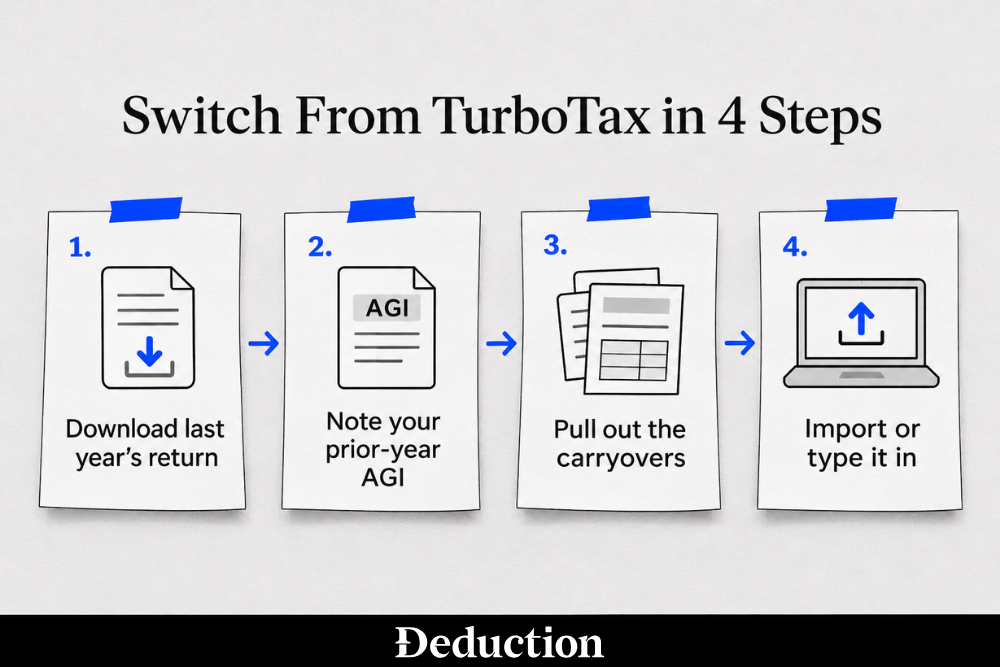
Here's how to do it:
- Download last year's return: Sign in to TurboTax with the same user ID, open your tax returns and documents, pick the year, and download the PDF. TurboTax Online keeps returns from the past seven years there, and a TurboTax Desktop return is saved on your computer.
- Note your prior-year AGI: Your adjusted gross income (AGI) is your total income minus certain adjustments. To validate an e-filed return, the IRS checks last year's AGI or Self-Select PIN, and an IP PIN replaces both.
- Pull out the carryovers: Look for capital losses you couldn't fully deduct, depreciation on a rental or business asset, and unused credits. You can deduct up to $3,000 of net capital losses a year ($1,500 if married filing separately) and carry the rest forward.
- Import the PDF or type it in: Some programs, such as TaxSlayer and Cash App Taxes, can import last year's PDF, but only basic details such as names and filing status come across.
Free Ways to File Now That IRS Direct File Is Gone
If you filed with IRS Direct File in 2025, that option is now gone: the program ended for the 2026 filing season. Free filing now runs through software companies and volunteers:
- IRS Free File: Partner companies offer free federal returns through the IRS site. For 2025 returns, the limit was an AGI of $89,000 or less, and each partner sets its own extra rules.
- Free File Fillable Forms: These are electronic IRS forms with no income limit, but they don't include state returns, and you get little help beyond the IRS instructions.
- VITA and TCE: These volunteer programs prepare returns for free. VITA is generally for people who make about $70,244 or less, and TCE focuses on people 60 and older.
- Free tiers: Cash App Taxes and OLT.com's Free Edition file federal returns for free without Free File, and TurboTax Free Edition still covers simple returns.
Free File is expected to reopen in January 2027, and the IRS Free File page now lists guided software for an AGI of $95,000 or less. Free options work best for simple to moderate returns, and most of them leave something out, such as a second state or help from a tax pro.
Let an AI Tax Agent Prepare Your Return From Your Documents
Every do-it-yourself option here, TurboTax included, still has you answering the interview. Which 1099 goes where? Does that expense count? Did last year's loss carry over? Paying TurboTax for an expert to step in adds a price that changes with your forms and the date you file.
Deduction is a tax filing service built around AI with CPAs and tax professionals ready to verify and advise. Upload your W-2s and 1099s, Taylor prepares your federal and state returns and asks about anything unclear, and a CPA or licensed tax professional reviews your return before it's filed.
Asking questions is free, and you pay when you're ready to file or need a licensed professional to review a high-impact decision. Ask Taylor about your return to get started.
Frequently Asked Questions About TurboTax Alternatives
Why Do People Stop Using TurboTax?
Most people leave over price. TurboTax Free Edition covers simple returns only, so self-employment income, investments or rentals move you into a paid tier, and every paid tier charges extra for state. Expert help costs more again, and its final price depends on your forms.
Who Are TurboTax's Main Competitors?
H&R Block is TurboTax's closest competitor, with similar do-it-yourself tiers, paid expert help and in-person offices. Lower-cost software, free filing apps and services that prepare the return for you, such as Deduction, compete on price or on how much of the work you hand over.
Is FreeTaxUSA Better Than TurboTax?
On price, it often is. FreeTaxUSA's federal return is free even with self-employment, rental or investment income, and each state return has a low flat fee. TurboTax offers more guidance and the option to add an expert, so it can suit people who want more help.
What Is the Easiest Tax Software to Use?
It depends more on your return than on the brand. If your situation is simple, almost any program walks you through it. If it isn't, the easiest option is often one where you upload documents and someone else prepares the return, such as Deduction, instead of learning each form yourself.
Is There a Free Alternative to TurboTax?
Yes. IRS Free File partners offer free federal returns if your AGI is within the limit ($89,000 or less for 2025 returns) and you meet the partner's own rules. Free File Fillable Forms work at any income, VITA volunteers help lower-income filers, and some software files federal returns for free outside Free File.
Is H&R Block Cheaper Than TurboTax?
Usually, for do-it-yourself filing. For 2025 returns, H&R Block's online tiers ran from $0 to $130, with $49 per state on paid tiers, while TurboTax's ran from $0 to $139, with state extra on paid tiers. Both charge more for expert help, and the final price depends on your forms.
This article is general information, not tax advice. Prices and features change, so confirm current pricing with each vendor, and check your own situation with a CPA or licensed tax professional before you file.
Related Articles
- Best H&R Block Alternatives in 2026: 8 Options Compared
- Deduction vs H&R Block
- 12 Best Self-Employed Tax Software Options to Manage Your Taxes as a 1099